
This article examines how Claude Code's internal source code was exposed through an npm source map leak, and offers a detailed analysis of the sophisticated architecture it revealed. Contrary to what Anthropic had called "open source," the core engine was proprietary closed-source code — containing 8-layer security, 4-stage message compression, cost-aware error recovery, and other designs optimized for real production environments. Unreleased features also exposed Anthropic's future roadmap (voice mode, multi-agent orchestration, proactive Kairos mode, and more), providing important insights into the development of agentic AI systems.
1. What Happened? 😮
On March 31, 2026, security researcher Chaofan Shou posted a few interesting screenshots on X (formerly Twitter). Anthropic's Claude Code internal source code had leaked wholesale from the npm package — because .map files, i.e., source map files, had not been removed from the production build. These are files that should only be used during development and deleted before deployment. 😅
As soon as the news broke, the Reddit r/LocalLLaMA community began analyzing the leaked codebase within hours. This was not an intentional hack or a sophisticated social engineering attack. A small mistake — failing to exclude .map files from the build pipeline — had enormous consequences. The incident simultaneously revealed how meticulously Anthropic had engineered Claude Code and how carelessly they had deployed it. For competitors and security researchers, it was an unexpected gift! 🎁
One point worth noting: Anthropic had been marketing Claude Code as "open source." There was even an official GitHub repository where anyone could browse the code. But what was actually there? 🤔 Mostly a plugin system, Hook examples, configuration file templates, and a handful of example plugins. By analogy, it was like displaying the restaurant menu and table settings and saying "our kitchen is open!" 🧑🍳
What the npm source map revealed was the entire kitchen — over 4,600 source files written in TypeScript/React, spread across more than 55 directories. Moreover, the license for this code was not Apache 2.0 but Anthropic's Commercial Terms of Service. So it can hardly be called truly open source.
In this article, we'll set aside the legal and ethical debates and dive deep into the technical architecture revealed by the leaked code. Honestly, it is quite impressive — apart from the accidental leak! 😉
2. The Overall Architecture: Far Larger Than Expected! 🤯
When first encountering Claude Code, it was easy to think "isn't this just an API wrapper?" It looked like a simple service: talk to Claude in the terminal, Claude fixes your code, done.
But the moment you opened the leaked code, that notion shattered completely. 💥
Tech Stack
Let's look at what technologies Claude Code is built with:
| Layer | Technology | Why This Choice |
|---|---|---|
| Runtime | Bun | Faster startup than Node.js with native TypeScript support. The feature() bundling API can eliminate unused code at build time. |
| Language | TypeScript (strict mode) | Type safety (error reduction) in a codebase of 4,600+ files was a necessity, not a choice. |
| UI | React 18 + [Ink](https://github.com/vadimdemedes/ink) | Renders React components in the terminal. Complex UIs like permission dialogs, progress bars, and multi-panel layouts justify the choice. |
| API Client | @anthropic-ai/sdk | Uses Anthropic's official SDK. |
| MCP Client | @modelcontextprotocol/sdk | Standard protocol for integrating external tool servers. |
| Feature Flags | GrowthBook | A tool for toggling specific features on/off on the server side, or running A/B tests. |
| Bundler | Bun bundler | Based on the feature() function, it strips unused code, efficiently separating internal and external builds. |
Using React in a terminal app might seem excessive. But the code shows complex interactions — PermissionDialog.tsx, WorkerBadge, multi-panel layouts, real-time streaming UI — that make the choice understandable. It's not a simple text-output terminal; it provides a remarkably rich user interface.
Official Open Source vs. Leaked Code: The Gap in Numbers
How large is the gap between what Anthropic called "open source" and the actual leaked code? The numbers tell the story clearly.
Official Repo (anthropics/claude-code) | Leaked Code | |
|---|---|---|
| File count | ~279 (scripts/config-focused) | 4,600+ (full-stack engine) |
| Core engine | Not included | Included |
| Tool implementations | Not included | All included (Bash, Read, Write, Edit, etc.) |
| Agentic loop | Not included | Included (query.ts, 1,729 lines) |
| Permission system | Not included | Included (permissions.ts, 52K) |
| API communication | Not included | Included (streaming, caching, fallback) |
| Bridge/remote | Not included | Included (33+ files) |
| MCP client | Not included | Included (client.ts, 119K) |
| License | Anthropic Commercial ToS | Proprietary commercial code |
279 files versus 4,600+ files — an enormous difference. 😮 At this point, it's worth reconsidering what the word "open source" really means.
3. The Agentic Loop: A Look Inside Claude Code's Heart ❤️🔥
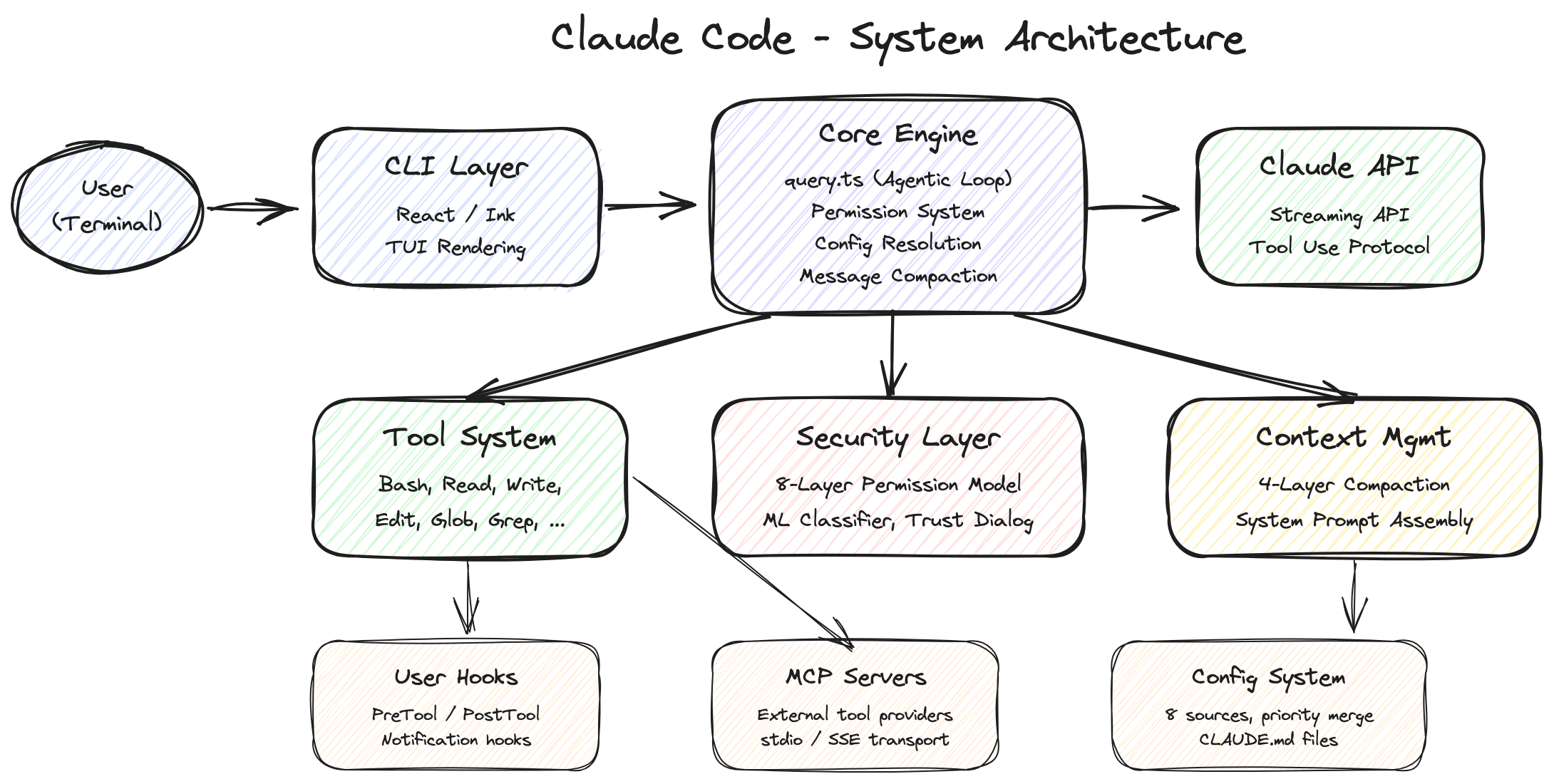
The most important part of Claude Code — its very heart — is the query.ts file. In this 1,729-line file lives a while(true) loop known as the "agentic loop." 🔄 This loop governs the entire cycle of receiving user input, executing the appropriate tools, and passing results back to Claude.
3.1 Async Generator: An Elegantly Chosen Design ✨
The first thing that stands out is the function's signature:
export async function* query(
  params: QueryParams,
): AsyncGenerator<
  | StreamEvent
  | RequestStartEvent
  | Message
  | TombstoneMessage
  | ToolUseSummaryMessage,
  Terminal  // return value: reason for termination
>
async function* is an async generator — it continuously yields events as a stream, and when the loop finally ends, it returns a value of type Terminal. Why is this a clever choice? 🤔
Traditionally, events would be delivered via EventEmitter or callbacks. But using an async generator lets you cleanly manage both the event stream and the loop's termination within a single function. Consumers use for await...of to receive events, and when the loop ends, they check the return value for the termination reason (Terminal). If an error occurs, it can be thrown from inside the generator and caught by the consumer's try-catch, making error handling natural.
It's a remarkably clean pattern for expressing complex state transitions, and particularly well-suited to loops performing repetitive operations like an agent.
3.2 Immutable Parameters + Mutable State: The Continue Site Pattern 🔄
The loop clearly separates two kinds of data:
Immutable parameters — values that never change throughout the loop:
type QueryParams = {
  messages: Message[];
  systemPrompt: SystemPrompt;
  canUseTool: CanUseToolFn; // permission check callback
  toolUseContext: ToolUseContext; // info needed for tool execution
  taskBudget?: { total: number }; // budget allocated to the API (beta)
  maxTurns?: number; // maximum turn limit
  fallbackModel?: string; // model to use if primary fails
  querySource: QuerySource; // where the query came from (REPL, agent, etc.)
  // ... other parameters
};
Mutable state — values updated on each iteration:
type State = {
  messages: Message[];
  toolUseContext: ToolUseContext;
  autoCompactTracking: AutoCompactTrackingState | undefined;
  maxOutputTokensRecoveryCount: number;
  hasAttemptedReactiveCompact: boolean;
  maxOutputTokensOverride: number | undefined;
  pendingToolUseSummary: Promise<ToolUseSummaryMessage | null> | undefined;
  stopHookActive: boolean | undefined;
  turnCount: number;
  transition: Continue | undefined; // why the previous turn continued
};
The key pattern here is the "Continue Site," as the source code comments explain directly:
// Continue sites write `state = { ... }` instead of 9 separate assignments.
Rather than modifying 9 individual fields one by one, the entire state object is reassigned:
state = {
  ...state,
  messages: newMessages,
  turnCount: nextTurnCount,
  transition: { reason: "next_turn" },
};
This pattern has two advantages. First, state changes are atomic — there's no risk of an error leaving only some of the 9 fields updated. Second, the transition field tracks why the loop continued to the next turn, making it easy during testing to verify that recovery paths worked correctly without inspecting message contents directly.
It feels like React's setState philosophy bleeding into a backend loop — revealing just how much Anthropic's engineers love React. 💖
The reason this pattern matters: a state management bug in the agent loop directly translates into user costs. Corrupted state triggers unnecessary API calls, which are billed as tokens. Competitors like Cursor and Windsurf likely implement similar agent loops, but without their source code being public, we can't know if they apply this level of rigorous state management.
3.3 The 6-Stage Per-Turn Pipeline: A Close Look 🧐
Each turn goes through the following 6 stages. Let's walk through them with the actual source line numbers.
Stage 1: Pre-Request Compaction (lines 365–548) 🧹
Before the API is called, this stage cleans up the conversation history. Five compression mechanisms are applied in sequence:
// 1. Apply Tool Result Budget (lines 369-394)
messagesForQuery = await applyToolResultBudget(
  messagesForQuery,
  toolUseContext.contentReplacementState,
  // Only agent/REPL sources persist replacement records (for resume)
  persistReplacements ? records => void recordContentReplacement(...) : undefined,
)
// 2. Snip Compact — cheapest and most aggressive (lines 401-410)
if (feature('HISTORY_SNIP')) {
  const snipResult = snipModule!.snipCompactIfNeeded(messagesForQuery)
  messagesForQuery = snipResult.messages
  snipTokensFreed = snipResult.tokensFreed
}
// 3. Microcompact — cache-aware tool result clearing (lines 413-426)
const microcompactResult = await deps.microcompact(messagesForQuery, toolUseContext, querySource)
messagesForQuery = microcompactResult.messages
// 4. Context Collapse — staged reduction (lines 440-447)
if (feature('CONTEXT_COLLAPSE') && contextCollapse) {
  const collapseResult = await contextCollapse.applyCollapsesIfNeeded(...)
  messagesForQuery = collapseResult.messages
}
// 5. Auto-Compact — full summarization when threshold exceeded (lines 453-543)
const { compactionResult, consecutiveFailures } = await deps.autocompact(...)
The order of compression is critical. Why does Context Collapse come before Auto-Compact? The source comments explain it clearly:
// Runs BEFORE autocompact so that if collapse gets us under the
// autocompact threshold, autocompact is a no-op and we keep granular
// context instead of a single summary.
If Collapse reduces the conversation length enough, Auto-Compact (an expensive API call) becomes a no-op. It's a smart strategy for preserving granular context while minimizing cost.
Once compression is done, the server can no longer see the full history, so the client must track the remaining task budget and report it to the server. Simple as it sounds, synchronizing state between server and client at compaction boundaries is one of the subtle challenges that frequently arises in agentic systems.
Stage 2: API Call & Streaming (lines 659–863) 🚀
for await (const message of deps.callModel(
  fullSystemPrompt,
  prependUserContext(messagesForQuery, userContext),
  toolUseContext,
  {
    taskBudget,
    taskBudgetRemaining,
    maxOutputTokensOverride,
    skipCacheWrite,
  },
)) {
  // handle streaming events
}
The key here is the StreamingToolExecutor — tools are executed in parallel while Claude is generating its response! 🏃♀️🏃♂️ The moment Claude types "let me read that file," the file is already being read. This is one of the secrets to minimizing the latency users perceive.
The implementation of this parallel execution is quite sophisticated:
// StreamingToolExecutor.ts
private canExecuteTool(isConcurrencySafe: boolean): boolean {
  const executingTools = this.tools.filter(t => t.status === 'executing')
  return (
    executingTools.length === 0 ||
    (isConcurrencySafe && executingTools.every(t => t.isConcurrencySafe))
  )
}
Every tool has an isConcurrencySafe flag. Read-only tools like FileReadTool, GlobTool, and GrepTool are safe to run in parallel. But tools that mutate system state, like FileWriteTool and BashTool, must run sequentially. If one tool errors, related tools are cancelled with a sibling_error:
type AbortReason =
  | "sibling_error" // a sibling tool errored → cancel me too
  | "user_interrupted" // user pressed Ctrl+C or ESC
  | "streaming_fallback"; // discarded due to model fallback
Model fallback is also handled at this stage. If the primary model fails:
if (innerError instanceof FallbackTriggeredError && fallbackModel) {
  currentModel = fallbackModel;
  attemptWithFallback = true;
  // create tombstones for orphaned messages
  yield *
    yieldMissingToolResultBlocks(
      assistantMessages,
      "Model fallback triggered",
    );
  // reinitialize StreamingToolExecutor and retry
}
Tombstone messages record that "this tool call was discarded due to model fallback," preserving consistency in the conversation history.
Stage 3: Error Recovery Cascade (lines 1062–1256) 🩹
This is one of the most impressive parts of the Claude Code architecture. An error doesn't mean giving up immediately. 🙅♀️ Instead, recovery is attempted in order from cheapest to most expensive.
Prompt-too-long (413 error) recovery — 3-stage cascade:
- Stage 1: Context Collapse drain (cost: 0) — Immediately applies already-prepared collapses, no additional API calls.
- Stage 2: Reactive Compact (cost: 1 API call) — Summarizes the entire conversation. Removes media like images, then retries with the summarized content. If the summary itself is too large, there's a "strip retry" that removes media and tries once more.
- Stage 3: Surface the error — If all attempts fail, the error is shown to the user.
Max output tokens exceeded recovery — also 3 stages:
- Stage 1: Token cap escalation (cost: 0)
— Transparently raises the exceeded token cap from 8K to 64K (
ESCALATED_MAX_TOKENS), with no user notification. - Stage 2: Resume message injection (cost: API re-call, up to 3 times)
— Injects "Your previous response was truncated. Please continue from where it left off" into the model and calls it again.
maxOutputTokensRecoveryCounttracks attempts and caps them at 3. - Stage 3: Recovery exhausted — After 3 attempts, completes with the results obtained so far.
The design principle of this cascade is crystal clear: the first attempt should always be free. Expensive operations like summarizing the entire conversation are used as a last resort. This isn't just "retry" — it's a recovery strategy that precisely considers cost and effectiveness.
Stage 4: Stop Hooks & Token Budget (lines 1267–1355) 🛑💰
Stop hooks run user-defined validation logic. For example, attaching a hook that says "don't stop until the tests pass" means that when Claude tries to finish, the hook runs, and if it fails, the hook's error message is injected into the conversation, causing Claude to try again.
The token budget is even more interesting:
function checkTokenBudget(tracker, budget, globalTurnTokens) {
  const pct = (turnTokens / budget) * 100
  const isDiminishing = (
    continuationCount >= 3 &&
    deltaSinceLastCheck < 500 &&  // DIMINISHING_THRESHOLD
    lastDeltaTokens < 500
  )
  if (!isDiminishing && turnTokens < budget * 0.9) {
    return { action: 'continue', nudgeMessage: ... }
  }
  return { action: 'stop', completionEvent: { diminishingReturns, ... } }
}
Diminishing returns detection is built in. If the loop continues 3 times in a row and generates fewer than 500 tokens each time, the system decides "there's no point in continuing" and stops. 📉 It keeps trying until 90% of the token budget is consumed, but without wasting unnecessary effort.
Why does this logic matter? The most dangerous situation in an agent loop is getting stuck in an infinite loop. 😵💫 It prevents Claude from repeatedly saying "let me try one more fix" while consuming tokens without making real progress. The diminishing returns detection automatically blocks that scenario.
Stage 5: Tool Execution (lines 1363–1520) 🛠️
Streaming mode (already started in stage 2) and batch mode (processing in bulk) coexist here:
// Streaming: concurrency-safe tools already executed during API response generation
if (streamingToolExecutor) {
  toolResults = await streamingToolExecutor.getRemainingResults();
}
// Batch: remaining tools are executed sequentially here
toolResults = await runTools(toolUseBlocks, toolUseContext, canUseTool);
There's also a progress notification feature. A Promise called progressAvailableResolve signals to consumers that "new progress is available," which is what drives the real-time spinner updates in the terminal UI. 🔄
Stage 6: Post-Tool & Next-Turn Transition (lines 1547–1727) ✨
After tool execution, several "housekeeping" tasks are handled:
// 1. Consume skill discovery — finalize what was prefetched in stage 1
if (pendingSkillPrefetch?.settledAt !== null) {
  const skillAttachments = await pendingSkillPrefetch.promise
}
// 2. Consume memory attachments — finalize what was prefetched
if (pendingMemoryPrefetch?.settledAt !== null) {
  const memoryAttachments = await pendingMemoryPrefetch.promise
}
// 3. Process queued commands — slash commands, task notifications, etc.
const queuedCommands = getCommandsByMaxPriority(...)
// 4. Refresh MCP server tools
if (toolUseContext.options.refreshTools) {
  toolUseContext.options.tools = toolUseContext.options.refreshTools()
}
Then the state transitions to the next turn:
// Continue Site: on to the next turn
state = {
  messages: [...messagesForQuery, ...assistantMessages, ...toolResults],
  toolUseContext: toolUseContextWithQueryTracking,
  autoCompactTracking: tracking,
  turnCount: nextTurnCount,
  transition: { reason: "next_turn" },
};
// return to the top of the while(true) loop
3.4 Termination Reasons: The 9 Ways the Loop Ends 🔚
The agentic loop can terminate for a variety of reasons:
| Termination reason | Meaning | Where it occurs |
|---|---|---|
completed | Normal completion (response ended without tool calls) | lines 1264, 1357 |
blocking_limit | Hard token limit reached | line 646 |
aborted_streaming | User interrupted during streaming (Ctrl+C) | line 1051 |
aborted_tools | User interrupted during tool execution | line 1515 |
prompt_too_long | Prompt length exceeded even after recovery attempts | lines 1175, 1182 |
image_error | Image validation failed (size exceeded, etc.) | lines 977, 1175 |
model_error | Unexpected model error | line 996 |
hook_stopped | Stop hook blocked continuation | line 1520 |
max_turns | Maximum turns set by maxTurns parameter exceeded | line 1711 |
3.5 QueryEngine.ts: The Higher-Level Session Manager 🏛️
If query.ts manages the loop for a single turn, QueryEngine.ts (1,295 lines) acts as the session-level manager:
class QueryEngine {
  mutableMessages: Message[]; // full conversation history
  permissionDenials: PermissionDenial[]; // tool permission denial records
  totalUsage: Usage; // cumulative token usage
  readFileState: FileStateCache; // file state cache (prevents duplicate reads)
  discoveredSkillNames: Set<string>; // discovered skills (reset per turn)
  loadedNestedMemoryPaths: Set<string>; // loaded memory paths (prevents duplication)
}
The submitMessage() method receives user input, calls the query() function, and accumulates the results into the session:
// accumulate usage
this.totalUsage = accumulateUsage(this.totalUsage, currentMessageUsage);
Transcript persistence also uses an asymmetric strategy:
// User messages: blocking save (essential for --resume restoration)
await recordTranscript(userMessage);
// Assistant messages: fire-and-forget (async, non-blocking)
recordTranscript(assistantMessage); // no await
Not all messages are saved with equal priority. User messages are saved synchronously because they're essential for session restoration. Assistant responses use a fire-and-forget strategy — "save, but don't wait for it to complete." This is a design choice that balances performance and reliability. 👍
4. Message Compression: A Sophisticated War Against the Context Window ⚔️
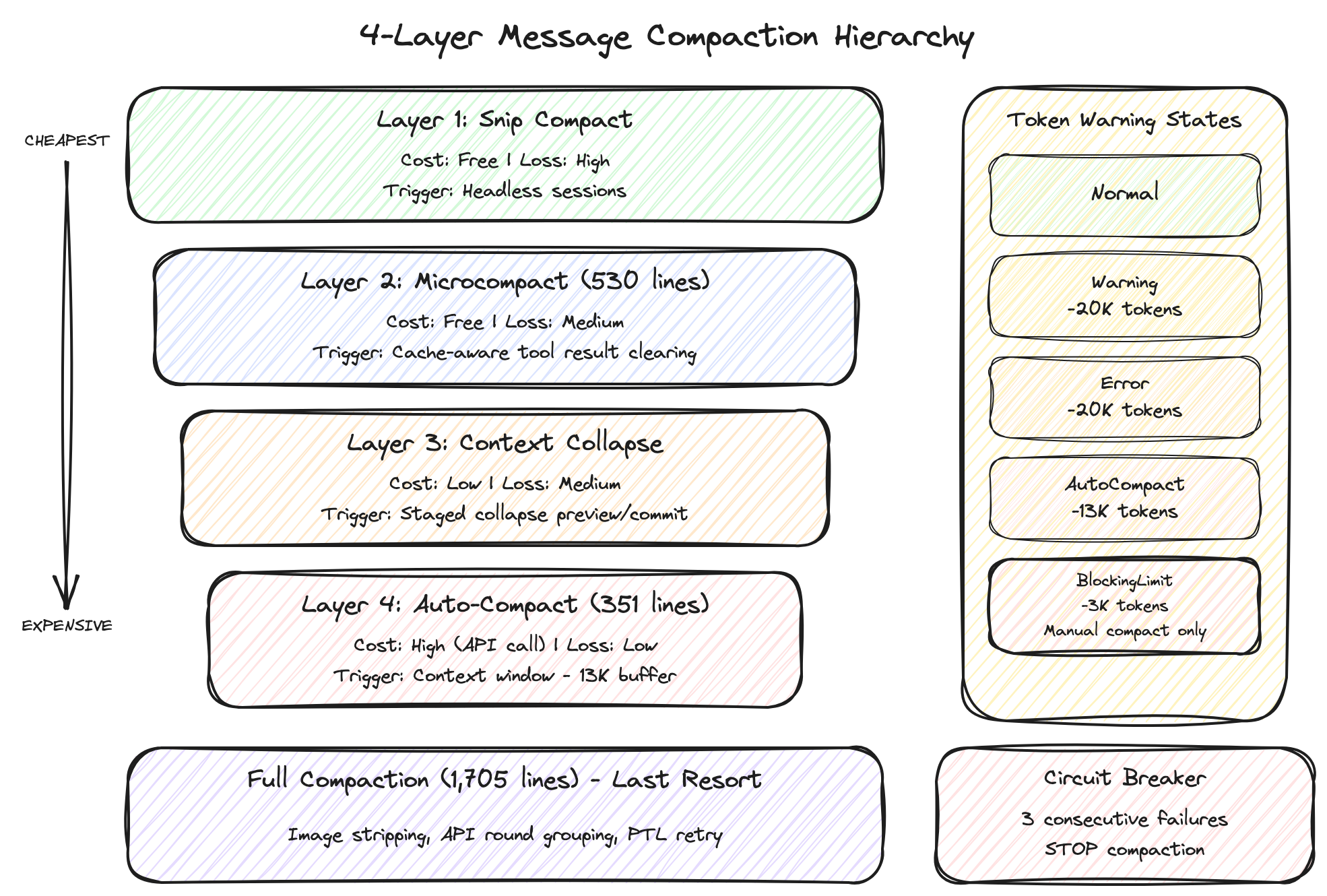
The greatest enemy of AI agent tools is the context window limit. As conversations grow, earlier content gets cut off, or the API returns a "413 Payload Too Large" error. Claude Code's compression system addresses this with a 4-layer hierarchy, each layer differing in cost and degree of information loss. The core principle is always "cheapest first"! 💰
4.1 Snip Compact — Cheapest and Most Aggressive ✂️
- Cost: Free (no API call)
- Information loss: High
This method removes older interior messages wholesale, retaining only recent conversation context. It's hidden behind the HISTORY_SNIP feature flag and used primarily in headless (background, no UI) sessions:
const snipResult = snipModule!.snipCompactIfNeeded(messagesForQuery)
messagesForQuery = snipResult.messages
snipTokensFreed = snipResult.tokensFreed
The snipTokensFreed value being passed into the auto-compaction stage is significant. Per the source comments:
// snipTokensFreed is plumbed to autocompact so its threshold check reflects
// what snip removed; tokenCountWithEstimation alone can't see it
If Snip already freed a significant number of tokens, this prevents Auto-Compact from triggering unnecessarily. A very efficient integration!
4.2 Microcompact (530 lines) — Cache-Respecting Selective Clearing 🧹
- Cost: Free (no API call)
- Information loss: Medium
This method selectively removes only certain tool results — not all of them, just specific types:
// Targets: file_read, shell, grep, glob, web_search, web_fetch, file_edit, file_write
// Replaces results with "[Old tool result content cleared]"
// Images/documents: estimated at 2,000 tokens
// Text: estimated by approximate token count
The real heart of this layer is cache editing block pinning, hidden behind the CACHED_MICROCOMPACT feature flag. It's designed to work harmoniously with the API's prompt caching:
const pendingCacheEdits = feature("CACHED_MICROCOMPACT")
  ? microcompactResult.compactionInfo?.pendingCacheEdits
  : undefined;
It tracks the IDs of already-cached tool results and manages them to maintain cache hits. A single cache miss on prompt caching means recalculating potentially tens of thousands of tokens. Reducing context while maintaining cache hit rates are competing goals, and this design shows an effort to balance them. ⚖️
4.3 Context Collapse — Staged Reduction 📉
- Cost: Low
- Information loss: Medium
This is a distinctive concept called "staged collapse." Rather than compressing the entire conversation at once, a preview stage decides which message blocks to collapse, and a commit stage actually performs the collapse.
The source code comments capture the essence of this design:
// Nothing is yielded — the collapsed view is a read-time projection
// over the REPL's full history. Summary messages live in the collapse
// store, not the REPL array. This is what makes collapses persist
// across turns: projectView() replays the commit log on every entry.
The collapsed view is a read-time projection over the REPL's full history. The original messages remain intact; only the collapsed results are stored in a separate store. Conceptually similar to Git's snapshot storage — providing a different "view" without touching the originals.
The advantage of this approach is that it maximizes cache hits for prompt caching. Since the original messages don't change, cached prefixes are not invalidated.
4.4 Auto-Compact (351 lines) — Last Resort 💥
- Cost: High (requires an additional Claude API call)
- Information loss: Low (AI summarizes, so key content is preserved)
This method sends the full conversation history to Claude and requests a summary. The threshold logic is clear:
function getAutoCompactThreshold(model: string): number {
  const effectiveContextWindow = getEffectiveContextWindowSize(model)
  return effectiveContextWindow - 13_000  // leaves a 13K token buffer
}
When the conversation length fills the context window minus 13,000 tokens, auto-compaction kicks in.
There's also a circuit breaker:
MAX_CONSECUTIVE_AUTOCOMPACT_FAILURES = 3;
Auto-compaction can fail — for instance, if the conversation is so long that the summarization request itself exceeds the context limit. Without this guard, you could end up in a loop of "compaction failed → retry → failed again." After 3 consecutive failures, the system cleanly gives up. A textbook example of defensive programming! 👍
4.5 Full Compaction (1,705 lines) — The Final Card 🃏
The full compaction logic invoked internally by Auto-Compact:
- Image stripping: Replaces images and documents with placeholders like
[image]/[document], dramatically reducing tokens. - API round grouping: Groups
tool_use→tool_resultpairs to preserve semantic units. - Thinking block removal: (Anthropic internal builds only) Removes reasoning blocks before compaction.
- PTL (Prompt-Too-Long) retry: If the compaction request itself exceeds the limit, it trims the oldest API round groups in 20% increments.
truncateHeadForPTLRetry(messages, ptlResponse) {
  // Trims the oldest API round groups until the prompt-too-long issue is resolved
  // Falls back by cutting groups in 20% increments
}
4.6 Token Warning State System 🚦
A 4-stage warning system provides visual feedback to users:
- [Normal]
- ↓ Context window − 20K tokens
- [Warning] ← yellow warning 🟡
- ↓ Context window − 20K tokens
- [Error] ← orange warning 🟠
- ↓ Context window − 13K tokens
- [AutoCompact] ← auto-compaction triggers
- ↓ Context window − 3K tokens
- [BlockingLimit] ← red, only manual compaction possible 🔴
Insight: Why 4-Stage Compression? 🤔
The 4 stages aren't simply "compress increasingly harder." Each stage offers a different trade-off:
- Snip: High information loss, but no impact on cache hits
- Microcompact: Selective information loss, cache-respecting
- Context Collapse: Original preserved, only the view is reduced
- Auto-Compact: Minimal information loss, but API call cost incurred
This is a Pareto optimization problem between "minimize cost" and "maximize information preservation." The 4 layers represent different points on that Pareto frontier — a genuinely clever design. 💡
5. The Tool System: A Systematically Extensible Swiss Army Knife 🇨🇭🔪
What Claude Code can actually do is determined by this tool system. Looking at tools.ts gives you the full picture of how tools are registered and managed.
5.1 The Tool Interface 🧩
All tools follow the same interface defined in Tool.ts:
// ToolUseContext — everything needed for tool execution lives here
type ToolUseContext = {
  options: { tools: Tools; mainLoopModel: string; mcpClients: MCPServerConnection[]; maxBudgetUsd?: number; ... }
  abortController: AbortController
  readFileState: FileStateCache    // prevents duplicate file reads
  getAppState(): AppState          // access application state
  setAppState(f: (prev: AppState) => AppState): void
  // ... 40+ fields (agent IDs, permission tracking, content replacement state, etc.)
}
Particularly notable is ToolPermissionContext:
type ToolPermissionContext = DeepImmutable<{
  mode: PermissionMode;
  additionalWorkingDirectories: Map<string, AdditionalWorkingDirectory>;
  alwaysAllowRules: ToolPermissionRulesBySource;
  alwaysDenyRules: ToolPermissionRulesBySource;
  alwaysAskRules: ToolPermissionRulesBySource;
  isBypassPermissionsModeAvailable: boolean;
  isAutoModeAvailable?: boolean;
  strippedDangerousRules?: ToolPermissionRulesBySource;
  shouldAvoidPermissionPrompts?: boolean; // for background agents
  awaitAutomatedChecksBeforeDialog?: boolean; // for coordinator workers
  prePlanMode?: PermissionMode; // saves mode before entering plan mode
}>;
This ToolPermissionContext is wrapped in DeepImmutable — permission-related information is read-only and cannot be accidentally modified. A critical security measure.
5.2 The 3-Tier Tool Registration Structure 🏛️
Looking at getAllBaseTools(), Claude Code's tools fall into three tiers:
- Always active: About 20 core tools including
BashTool,FileReadTool,FileEditTool,WebSearchTool, andAgentTool. These handle Claude Code's fundamental capabilities. - Conditionally active: Tools toggled on or off based on environment or configuration. For example,
GlobToolandGrepToolare disabled in Anthropic's internal builds because Bun's binary includes built-in equivalents likebfs/ugrep.PowerShellToolis Windows-only;LSPToolrequires an explicit environment variable to enable. - Feature-flag gated (unreleased): Tools managed by the
feature()function — not yet public.WebBrowserTool,WorkflowTool,SleepTool,PushNotificationTool, and 15+ others fall here. These are covered in more detail in section 7.
Interesting are the Anthropic internal-only tools gated by USER_TYPE === 'ant':
const REPLTool =
  process.env.USER_TYPE === "ant"
    ? require("./tools/REPLTool/REPLTool.js").REPLTool
    : null;
Tools like REPLTool, ConfigTool, TungstenTool, and SuggestBackgroundPRTool don't exist for external users. This means Anthropic engineers have a separate set of special tools available internally. TungstenTool in particular is opaque by name alone — but given that tungsten is a dense metal, one might speculate it handles "heavy-duty" operations. 🧐
Why does this 3-tier structure matter? In AI agent tools, "what capabilities to grant" is a core design decision. Too many tools bloat the system prompt, increasing token costs; too few limits the agent's capabilities. Claude Code addresses this with a 3-tier approach: build-time elimination + conditional activation + feature flags. Competitors like Cursor and Devin face the same tool-expansion challenges, and this layered approach makes for valuable reference material.
5.3 Assembling the Tool Pool: Cache Stability by Design 🏗️
In assembleToolPool(), the logic that merges built-in tools with MCP (Model Context Protocol) tools shows an interesting consideration for prompt cache stability:
export function assembleToolPool(permissionContext, mcpTools): Tools {
  const builtInTools = getTools(permissionContext);
  const allowedMcpTools = filterToolsByDenyRules(mcpTools, permissionContext);
  // Sort each group separately for prompt-cache stability, keeping built-ins as a contiguous prefix.
  // The server's claude_code_system_cache_policy places a global cache breakpoint after the last
  // prefix-matching built-in tool. Flat sorting would allow MCP tools to interleave with built-ins,
  // invalidating all downstream cache keys whenever MCP tools are sorted between built-ins.
  const byName = (a: Tool, b: Tool) => a.name.localeCompare(b.name);
  return uniqBy(
    [...builtInTools].sort(byName).concat(allowedMcpTools.sort(byName)),
    "name",
  );
}
Built-in and MCP tools are sorted separately, then concatenated. Why not sort everything together? 🧐 Because the server's claude_code_system_cache_policy places a cache breakpoint after the last built-in tool. If everything were sorted flat, MCP tools could interleave between built-ins, and whenever an MCP tool is added or removed, all downstream cache keys would be invalidated.
This level of cache optimization appears to come from hard-won production cost experience — a window into how seriously token costs are taken during development. 💸
5.4 Dynamic Tool Search 🔍
A beta feature under the name tool-search-2025-10-16. When there are dozens of tools, just the system prompt (initial instructions passed to the LLM) can consume a significant number of tokens. Rather than showing Claude all tools upfront, this feature searches and loads tools on demand:
// tools.ts:247-249
// Include ToolSearchTool when tool search may be enabled (optimistic check)
// Actual tool deferral decision is made at request time in claude.ts.
...(isToolSearchEnabledOptimistic() ? [ToolSearchTool] : []),
The term "optimistic check" is telling: at registration time, it's assumed optimistically that the tool may be included, and the actual decision to defer is made at API request time. Think of it as a lazy-loading pattern for LLMs! 🐌
6. Multi-Layer Security: Peeling the Onion 🧅
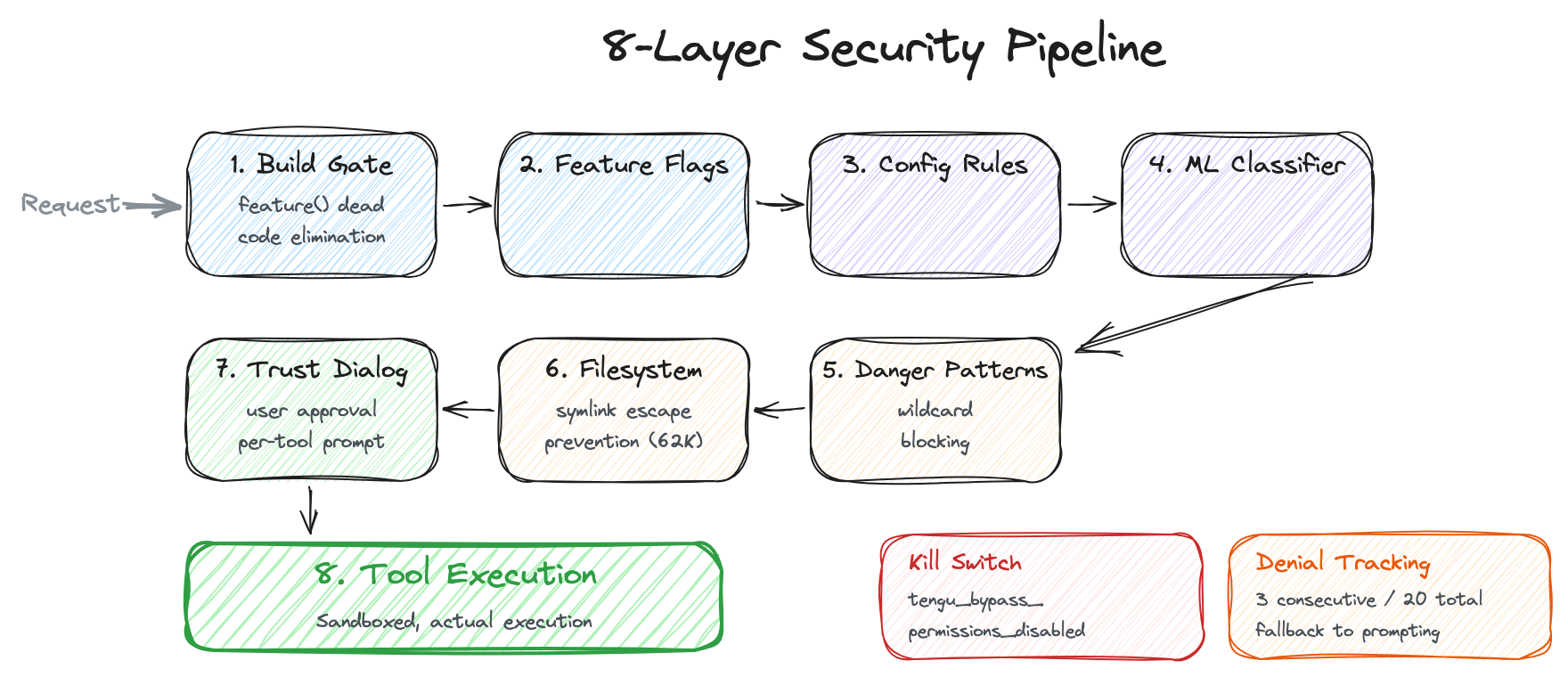
The phrase "an AI agent with access to my file system" is enough to alarm security researchers. 😱 Examining how Claude Code handles this reveals 8 layers of defense, stacked like the layers of an onion.
6.1 Layer 1: Build-Time Gate — Security Through Non-Existence 🚫
// tools.ts:117-119
const WebBrowserTool = feature("WEB_BROWSER_TOOL")
  ? require("./tools/WebBrowserTool/WebBrowserTool.js").WebBrowserTool
  : null;
The feature() function used here is evaluated at build time. The Bun bundler physically removes the require() branch when the feature evaluates to false. This means the externally distributed build physically does not contain the code for Anthropic's internal tools. 😮 Changing environment variables at runtime to enable the feature is impossible — the code simply doesn't exist in the binary.
It's a clever approach: branching "internal" and "external" builds from the same codebase while avoiding the security risks of runtime conditionals. The irony, of course, is that what was exposed in this incident was precisely the code that the build-time removal was supposed to eliminate — left behind in source maps. 😅
The USER_TYPE environment variable is used the same way:
// tools.ts:16-19
const REPLTool =
  process.env.USER_TYPE === "ant"
    ? require("./tools/REPLTool/REPLTool.js").REPLTool
    : null;
6.2 Layer 2: Feature Flags — Server-Side Kill Switches 🚨
Even after a build ships, specific features can be controlled server-side. GrowthBook-based flags with the tengu_ prefix serve this role:
| Flag | Role |
|---|---|
tengu_amber_quartz_disabled | Voice mode kill switch (force-disables voice mode) |
tengu_bypass_permissions_disabled | Permission bypass mode kill switch |
tengu_auto_mode_config.enabled | Auto-mode circuit breaker |
tengu_ccr_bridge | Remote control credential verification |
tengu_sessions_elevated_auth_enforcement | Requires trusted device token for specific sessions |
If a security incident occurs, these kill switches can be activated instantly on the server to disable a problematic feature — without a client update. From an incident response perspective, the ability to disable features without deploying a new client is extremely valuable.
Anthropic internally can override these with an environment variable:
// CLAUDE_INTERNAL_FC_OVERRIDES (Anthropic-only)
// '{"my_feature": true, "my_config": {"key": "val"}}'
6.3 Layer 3: Configuration-Based Rules — Priority Across 8 Sources 📜
Permission rules come from various sources, each with a defined priority:
type PermissionRule = {
  source: PermissionRuleSource; // one of 8 sources
  ruleBehavior: "allow" | "deny" | "ask";
  ruleValue: {
    toolName: string; // "Bash", "FileEdit", etc.
    ruleContent?: string; // pattern, e.g., "python:*"
  };
};
Rule source priority (highest to lowest):
userSettings— user home directory config (~/.claude/settings.json)projectSettings— project directory config (.claude/settings.json)localSettings— local-only config (.claude/local.json)flagSettings— via GrowthBook feature flagspolicySettings— organization-level policies (for enterprise)cliArg— passed via command-line argumentscommand— dynamically updated rules at runtimesession— in-memory rules valid only for the current session
6.4 Layer 4: Transcript Classifier — AI Watching AI 🕵️♀️
yoloClassifier.ts — a 52KB file. (A file named "YOLO" at 52KB — Anthropic engineers' sense of humor showing through. 😄)
In auto mode, rather than asking the user "is this okay?" every time, the system makes an additional Claude API call to judge the safety of each tool use:
- Tool use request arrives
- Whitelist check
— Read-only tools like
FileRead,Grep,Glob, andTasksskip the classifier and are automatically permitted - Classifier API call → "allow" or "deny"
- Denial tracking: — 3 consecutive denials → fall back to prompting mode (ask the user directly) — 20 total denials → fall back to prompting mode
The denial-tracking fallback mechanism is important. If the classifier is too conservative, user experience suffers, so beyond a certain number of denials, the system switches to "just ask the user."
For debugging, setting CLAUDE_CODE_DUMP_AUTO_MODE=1 saves the classifier's request/response as JSON files in /tmp/claude-code/auto-mode/. A useful tip when wondering why Claude Code's auto mode is rejecting certain operations!
If the classifier returns an API error? Fall back to prompting — not an automatic denial. This is a fail-open strategy: "when uncertain, ask the user." While fail-open is generally risky in security, the fallback of "user decides directly" makes it a reasonable choice here.
6.5 Layer 5: Dangerous Pattern Detection ⚠️
Certain command patterns are flagged as dangerous and blocked:
DANGEROUS_BASH_PATTERNS = [
  "python",
  "node",
  "ruby",
  "perl",
  "bash",
  "sh",
  "zsh",
  "ksh",
  "exec",
  "eval",
  "source",
  "curl",
  "wget",
  "nc",
  "ncat",
  "socat",
  "dd",
  "xxd",
  "openssl",
  "ssh",
  "scp",
  "sftp",
  "sudo",
  "su",
  "chroot",
  "unshare",
  "docker",
  "podman",
  "chmod",
  "chown",
  "chgrp",
  "umask",
  "mount",
  "umount",
];
In auto mode, setting python:* or interpreter wildcards (e.g., python -*) as allow rules is blocked:
isDangerousBashPermission(rule) {
  // tool-level allow without content (allow all bash) → dangerous
  // "python:*", "python*", "python -*" → dangerous
  // interpreter prefix + wildcard → dangerous
}
Interpreter-based arbitrary code execution can bypass Bash sandboxing, so this preemptively blocks attacks like python -c "import os; os.system('rm -rf /')". A very smart defense!
6.6 Layer 6: File System Permission Validation (62KB) 📂
The largest permission file (62KB) is dedicated solely to file path validation:
- Absolute path normalization: Properly handles special characters like
.and..in relative paths. - Symlink escape prevention: Blocks attacks where symlinks inside allowed directories point outside the permitted scope.
- Safe glob pattern expansion: Ensures patterns like
/**/*don't include unexpected paths. - CWD-only mode vs. full-access mode: In
acceptEditsmode, file access is limited to the current working directory. - Scratchpad support: Allows coordinator workers to access shared directories (
tengu_scratch). - Windows/POSIX path handling: Handles both Windows and POSIX (Unix/Linux) paths correctly for cross-platform compatibility.
6.7 Layer 7: Trust Dialog 🤝
The security dialog that appears when Claude Code is first launched. It reviews and obtains user consent for:
- Project-scoped MCP server configuration
- Custom Hook configuration
- Bash permission settings
- API key helpers
- AWS/GCP command access
- OTEL (OpenTelemetry) header configuration
Failing to pass this Trust Dialog blocks all file and file system operations.
6.8 Layer 8: Bypass Permissions Kill Switch 🔪
The final line of defense. When the tengu_bypass_permissions_disabled flag is activated on the GrowthBook server:
// bypassPermissionsKillswitch.ts
// Prevents users from entering bypass mode entirely
// Forces reversion to the previous mode
// Displays a diagnostic message
It completely prevents users from entering permission bypass mode and forcibly reverts them to the prior mode.
Insight: The Design Philosophy of the Security Model 💡
A consistent set of principles runs through all 8 layers:
- Deny by default — something must be explicitly allowed to work.
- Fail to prompting, not to deny — when uncertain, ask the user rather than refusing outright.
- Defense in depth — if one layer is breached, the next one provides cover.
- Server-side kill switches — features can be disabled instantly without a client update.
- Build-time elimination — if the code doesn't exist, neither can the vulnerability.
7. Unreleased Features: Anthropic's Roadmap Has Leaked! 🗺️
Features hidden behind feature flags were exposed to the world through this incident. They were probably the most "unintended gift" of all for competitors. 🎁
7.1 Voice Mode — Code by Speaking 🗣️💻
// voice/voiceModeEnabled.ts
export function isVoiceModeEnabled(): boolean {
  return hasVoiceAuth() && isVoiceGrowthBookEnabled();
}
export function hasVoiceAuth(): boolean {
  // OAuth only (requires Claude.ai account)
  // Not available with API keys/Bedrock/Vertex
  // Uses the voice_stream endpoint
}
export function isVoiceGrowthBookEnabled(): boolean {
  return feature("VOICE_MODE")
    ? !getFeatureValue_CACHED_MAY_BE_STALE(
        "tengu_amber_quartz_disabled",
        false,
      )
    : false;
}
Several important facts emerge from this code:
- A dedicated
voice_streamAPI endpoint exists, separate from the standard Messages API. - OAuth-only — not accessible via API keys or third-party clouds like AWS Bedrock or Google Cloud Vertex AI. Requires a Claude.ai account.
- A GrowthBook kill switch (
tengu_amber_quartz_disabled) can instantly disable voice mode if problems arise server-side. - The caching strategy uses
_CACHED_MAY_BE_STALE— the flag value is read from cache rather than querying the server in real time, optimizing performance.
7.2 Web Browser Tool — Real Browser Automation 🌐🤖
const WebBrowserTool = feature("WEB_BROWSER_TOOL")
  ? require("./tools/WebBrowserTool/WebBrowserTool.js").WebBrowserTool
  : null;
The current WebFetchTool simply fetches static HTML pages. But WebBrowserTool is believed to be a real browser automation tool leveraging Bun's WebView API — capable of interacting with SPA (Single Page Application) pages that require JavaScript rendering. Think of it as the CLI version of OpenAI's Computer Use (formerly Web Browsing) feature!
7.3 Coordinator Mode — Multi-Agent Orchestration (19KB) 🧑🤝🧑
One of the most ambitious unreleased features:
// coordinator/coordinatorMode.ts
export function isCoordinatorMode(): boolean {
  if (feature("COORDINATOR_MODE")) {
    return isEnvTruthy(process.env.CLAUDE_CODE_COORDINATOR_MODE);
  }
  return false;
}
A Coordinator doesn't write code directly. Instead, it creates multiple worker agents and distributes work among them, acting as a meta-orchestrator:
- Workers are created via
AgentTool. - Results arrive as
<task-notification>XML blocks. SendMessagesends follow-up instructions to workers.TaskStopterminates workers.
The tools available to a Coordinator are tightly restricted:
COORDINATOR_MODE_ALLOWED_TOOLS = new Set([
  "AgentTool", // create workers
  "TaskStop", // terminate workers
  "SendMessage", // communicate with workers
  "SyntheticOutput", // generate output
]);
A Coordinator cannot execute Bash commands. It cannot read files either. Its role is solely to manage workers. This is the principle of least privilege taken to an extreme. If the orchestrator could directly execute tools, it would itself become a single point of failure.
There's also a shared scratchpad (tengu_scratch GrowthBook gate) — a directory for information sharing between workers, bypassing normal file system permission checks since workers need access to the scratchpad outside their working directory.
This is effectively a microservice architecture for AI agents — one Claude orchestrating multiple Claudes, with each worker operating independently in an isolated context.
7.4 Kairos — The Proactive Assistant ⏰💡
From the Greek word for "the right moment," Kairos is a mode where Claude acts first:
| Feature flag | Tool | Function |
|---|---|---|
KAIROS | SendUserFileTool | Proactively sends files to the user |
KAIROS || KAIROS_PUSH_NOTIFICATION | PushNotificationTool | Mobile/desktop push notifications |
KAIROS_GITHUB_WEBHOOKS | SubscribePRTool | Subscribes to GitHub PR webhooks |
PROACTIVE || KAIROS | SleepTool | Background waiting (timer) |
KAIROS_CHANNELS | (unknown) | Multi-channel integration |
KAIROS_BRIEF | (unknown) | Checkpoint/status updates |
Picture this scenario: a new review comment lands on a GitHub PR, SubscribePRTool detects it, checks the CI result, and PushNotificationTool sends a notification like "PR #123 has a review, and CI failed. Here's what to fix." SleepTool can wake the agent on a schedule to poll for status.
This is a structure where Claude handles work without the user opening a session — a transition from coding assistant to autonomous software engineering agent. 🚀
7.5 Agent Triggers & Monitoring 🕰️📊
const cronTools = feature("AGENT_TRIGGERS")
  ? [CronCreateTool, CronDeleteTool, CronListTool]
  : [];
const RemoteTriggerTool = feature("AGENT_TRIGGERS_REMOTE")
  ? require("./tools/RemoteTriggerTool/RemoteTriggerTool.js")
      .RemoteTriggerTool
  : null;
const MonitorTool = feature("MONITOR_TOOL")
  ? require("./tools/MonitorTool/MonitorTool.js").MonitorTool
  : null;
Cron jobs (scheduled tasks) created by an agent are tagged with that agent's agentId and routed to its message queue. This means a long-running agent can manage its own schedule.
7.6 UDS Inbox — Multi-Device Messaging 📱💻
const ListPeersTool = feature("UDS_INBOX")
  ? require("./tools/ListPeersTool/ListPeersTool.js").ListPeersTool
  : null;
"UDS" is believed to stand for Unified Device Stack. Agents can query "peers" (other connected devices or instances) and route messages via bridge:// or other:// schemas.
This evokes a future where Claude on your laptop communicates with Claude on your desktop. It may still be far off, but the foundation is already in place. 🌉
7.7 Workflow Scripts 📝⚙️
const WorkflowTool = feature("WORKFLOW_SCRIPTS")
  ? (() => {
      require("./tools/WorkflowTool/bundled/index.js").initBundledWorkflows();
      return require("./tools/WorkflowTool/WorkflowTool.js").WorkflowTool;
    })()
  : null;
There are bundled workflows (pre-built automation scripts) with an initialization system. Recursive workflow execution inside sub-agents is blocked (included in ALL_AGENT_DISALLOWED_TOOLS).
Insight: What Unreleased Features Reveal About Anthropic's Direction 🧭
Taken together, these unreleased features make Anthropic's strategy unmistakably clear:
- CLI → Platform: Moving beyond a simple terminal tool toward a complex platform linking multiple devices and agents.
- Reactive → Proactive: Shifting from a passive role waiting for user commands to an autonomous one that monitors independently and sends notifications.
- Text → Multimodal: Expanding from keyboard-centric input to voice, browser automation, and other interaction modes.
- Single → Orchestrated: Evolving from a single agent handling everything toward a distributed system with a coordinator managing a swarm of agents.
7.8 Bridge — Remote Control System (33+ Files) 🌉
The Bridge system is a massive subsystem comprising more than 33 files. It serves as the backend for the "Remote Control" feature that lets users control local Claude Code from the claude.ai website.
Connection Flow 🔗
- The user logs into claude.ai via OAuth.
- The CCR (Claude Cloud Runtime) API checks subscription status and the GrowthBook flag (
tengu_ccr_bridge). - Local Claude Code obtains an
environment_idandenvironment_secret. - An authenticated tunnel is established over WebSocket.
- The browser executes local tools via the Bridge API and receives results.
Security Tiers 🛡️
The Bridge system uses two tiers based on security level:
| Tier | Authentication requirement | Use case |
|---|---|---|
| Standard | OAuth token | Ordinary remote sessions |
| Elevated | OAuth + Trusted Device Token (JWT) | Sessions involving sensitive operations |
The Elevated tier additionally verifies device trustworthiness via the X-Trusted-Device-Token header:
// bridge/trustedDevice.ts
// JWT bound to a physical device
// Ensures "this request really came from the registered device"
Session Isolation 🔒
Each remote session is isolated via a Git worktree. Even if two browser tabs connect to the same project simultaneously, each operates in an independent working directory — preemptively eliminating merge conflicts between sessions. A clever approach.
Session lifecycle is managed by sessionRunner.ts, using a JWT-signed WorkSecret to maintain session handover security.
Insight: Design Lessons from the Remote Control System 🧐
The standout point in the Bridge system is its session isolation strategy. Using Git worktrees as the unit of isolation is a pragmatic choice — leveraging existing infrastructure (Git) to achieve file-system-level isolation. Lower overhead than containers or VMs, while still giving each session its own independent working directory.
The 2-tier authentication structure (Standard/Elevated) is also instructive. Requiring maximum authentication for all remote operations hurts user experience; too low a bar weakens security. Varying the authentication level by operation sensitivity is a realistic way to balance security and convenience. 👍
8. What This Architecture Means for the Industry 💡
Getting this rare look inside Claude Code through the leaked code was an exceptional opportunity to understand the real operational architecture of AI agent tools. Let's distill a few key lessons.
Agentic Systems Are Far More Complex Than You Think! 🤯
"Call the LLM API and execute a tool — done!" That's a demo-level, extremely simplified understanding. Real production agentic systems require:
- Context management: A 4-stage precision compression hierarchy, cache-stability-oriented tool ordering, client-server budget synchronization.
- Error recovery: Cost-aware cascades, diminishing returns detection, circuit breakers.
- Security: 8-layer defense in depth, ML-based auto-judgement, build-time code elimination.
- Performance: Parallel tool execution during streaming, deferred concurrent prefetching, asymmetric transcript persistence.
Claude Code's 4,600 files are definitive proof of this complexity. Competitors like OpenAI's Codex, Cursor, and Devin likely have comparable internal complexity — their code just hasn't been made public.
Cost Drives Architecture 💰
One of the most important principles running through the Claude Code architecture is cost-awareness:
- Error recovery always tries the free option first.
- Message compression begins with methods that require no API calls.
- Diminishing returns detection stops unnecessary token waste.
- Tool ordering is designed to optimize prompt cache hit rates.
- Tool search loads only when needed to conserve resources.
In LLM systems where every API call directly translates to cost, the principle of "cheapest first" is not merely technical elegance — it's an economic survival strategy. Every team building agentic systems will eventually face this problem.
"Open Source" Needs a New Definition 🤔
The Claude Code case raises profound questions about the meaning of "open source" in the AI era. Only the plugin interface (279 files) was publicly available in the official repository, while the core engine (4,600+ files) was hidden behind a commercial license. Can this rightly be called "open source"?
This is not a problem unique to Anthropic. Many AI products wear the "open" label while publishing only extension interfaces and keeping the core technology private. It is essential for users and developer communities to clearly recognize this distinction.
9. Closing Thoughts: What the Leak Tells Us 🎓
Through the absurd vector of an npm source map, the internals of Claude Code were revealed to the world — not as a simple API wrapper, but as a full-stack agent platform spanning 4,600 files.
Eight layers of defense, a 4-stage message compression hierarchy, diminishing returns detection, cost-aware error recovery, and cache-stability-conscious tool ordering — these details reflect production-level engineering that can't be found in any mere "API wrapper."
The unreleased features make Anthropic's future direction unmistakably clear. Voice mode, web browser automation, multi-agent coordinators, and the proactive Kairos mode all suggest that the transition from "coding assistant" to "autonomous software engineering platform" is already actively underway at the code level.
There is an irony here. Anthropic implemented a sophisticated security mechanism — build-time dead code elimination — yet neglected to exclude source map files from that same build pipeline. They wrapped users' file systems in 8 layers of onion-skin protection, while inadvertently exposing their own source code on npm. 🤷♀️
The patterns introduced in this analysis — cost-aware error recovery, multi-stage context compression, build-time feature gates, diminishing returns detection — are not specific to Claude Code. They are valuable reference material for any developer building agentic AI systems. The principle of "always try the cheapest recovery first" is a lesson that must be applied to every LLM application where API cost is a key variable.
Perhaps this is the essence of software engineering: even the most elaborately designed system can be undone by the simplest of mistakes. What Anthropic's engineers have built is genuinely impressive agentic architecture. They just need to remember to add *.map to their .npmignore file next time. 😉
This article is intended as a technical analysis of the leaked source code and does not encourage redistribution or use of that code. All code copyrights belong to Anthropic PBC.