
Understanding how AI coding tools like Cursor, Windsurf, and Copilot work internally allows you to use them far more effectively, especially on complex, large codebases. Many people treat AI IDEs like traditional tools and hit limitations. But understanding the internal workings and constraints of these tools can dramatically improve your workflow -- like unlocking a cheat code. For reference, the author writes about 70% of their code using Cursor.
How AI IDEs Work: LLM Fundamentals
AI coding tools run on LLMs (Large Language Models), which fundamentally work by simply predicting the next word. Complex applications are built on top of this simple principle.
Three Key Stages of LLMs
- Base LLM: Initially, results were predicted based purely on prompts (input text). For example, instead of "write me a poem about whales," you had to format input like "Subject: Whales\nPoem: " to get desired results.
- Instruction Tuning: With models like ChatGPT, you can now make natural language requests like "Write a PR that refactors the Foo method." Internally it's still autocompletion, but the prompt format became more intuitive.
- Tool Calling: LLMs evolved beyond text generation to interact with external systems. For example, prompts like "if you need to read a file, call
read_file(path: str)" allow LLMs to actually read files and continue their work.
"IDEs like Cursor are complex wrappers around this simple concept."
How to Build an AI IDE Like Cursor
Building an AI IDE like Cursor involves these steps:
- Fork VSCode: Create a new IDE based on VSCode.
- Add a chat UI: Add a chat interface for user interaction.
- Implement tools for the coding agent:
read_file(full_path: str)write_file(full_path: str, content: str)run_command(command: str)
- Optimize internal prompts: Add instructions like "You are an expert" and "Don't guess -- use tools."
But building just this much can lead to syntax errors, hallucinations, and inconsistency. Therefore, understanding LLM strengths and weaknesses and designing prompts and tools accordingly is crucial.
Cursor's Internal Workings
AI IDEs like Cursor go through multiple stages to process user commands. Below is a simplified diagram of Cursor's internal process:
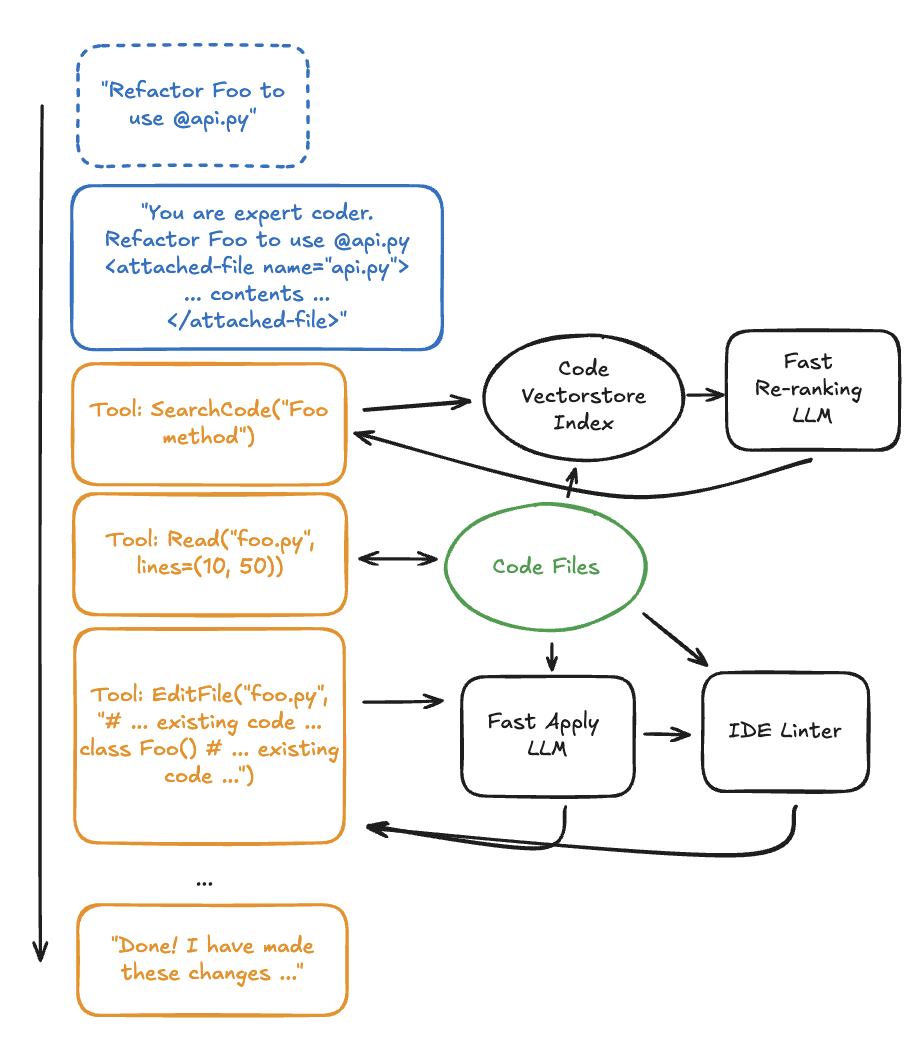
- The user specifies particular files or folders using tags like
@file. - The IDE passes the file contents to the LLM.
- The LLM performs the necessary work and returns results to the user.
Optimization and User Tips
To use Cursor more effectively, consider these tips:
1. Actively Use @file/@folder Tags
- If you already know which files or context are needed, explicitly specify them with
@filetags.Tip: Providing clear context yields faster and more accurate responses.
2. Optimize Code Search
- Code search can be complex, but Cursor uses a vectorstore to index codebases, providing more accurate search results.
Tip: Code comments and documentation are very important for improving search accuracy. Add a paragraph at the top of files explaining the file's role and when it was last updated.
3. Optimize File Writing Tools
- Instead of having the LLM write entire files, it's designed to generate "semantic diffs" (showing only changed portions).
Tip: Files over 500 lines may cause errors, so keep files small. Tip: Use a high-quality linter to reduce syntax errors and help the agent self-correct.
4. Choose the Right Model
- Not all LLMs are suited for AI IDEs. Cursor uses Anthropic models (e.g., Claude 3.5 Sonnet) for optimized results.
Tip: Choose models optimized for agent-centric use rather than general coding models.
Cursor's Prompt Design
One of Cursor's secrets to success lies in prompt design. Cursor includes instructions to finely tune LLM behavior:
- "Never apologize." (Added to prevent the Sonnet model's tendency to frequently apologize)
- "Don't mention tool names." (A guideline for improving user experience)
- "If you can't fully satisfy the user's request, gather more information." (Prevents LLMs from being overly confident)
- "Don't hardcode API keys." (A guideline to prevent security issues)
Tips for Writing Cursor Rules
Cursor's rules play an important role in how LLMs perform tasks. Here are key considerations when writing rules:
- Don'ts:
- Don't assign identities like "You are a TypeScript expert."
- Avoid negative commands like "Don't delete this code."
- Dos:
- Write rule names and descriptions concisely and intuitively.
- Write rules like an encyclopedia, linking information about modules and code changes.
- Try using Cursor itself to draft rules.
Conclusion
Cursor started as a simple VSCode fork but has grown into an AI coding tool valued at over $1 billion. Hopefully this article has helped you understand how AI IDEs like Cursor work and learn methods to use them more effectively.
"If Cursor isn't working properly for you, you're using it wrong." (To get the most out of this tool, understanding its internal workings is essential!)