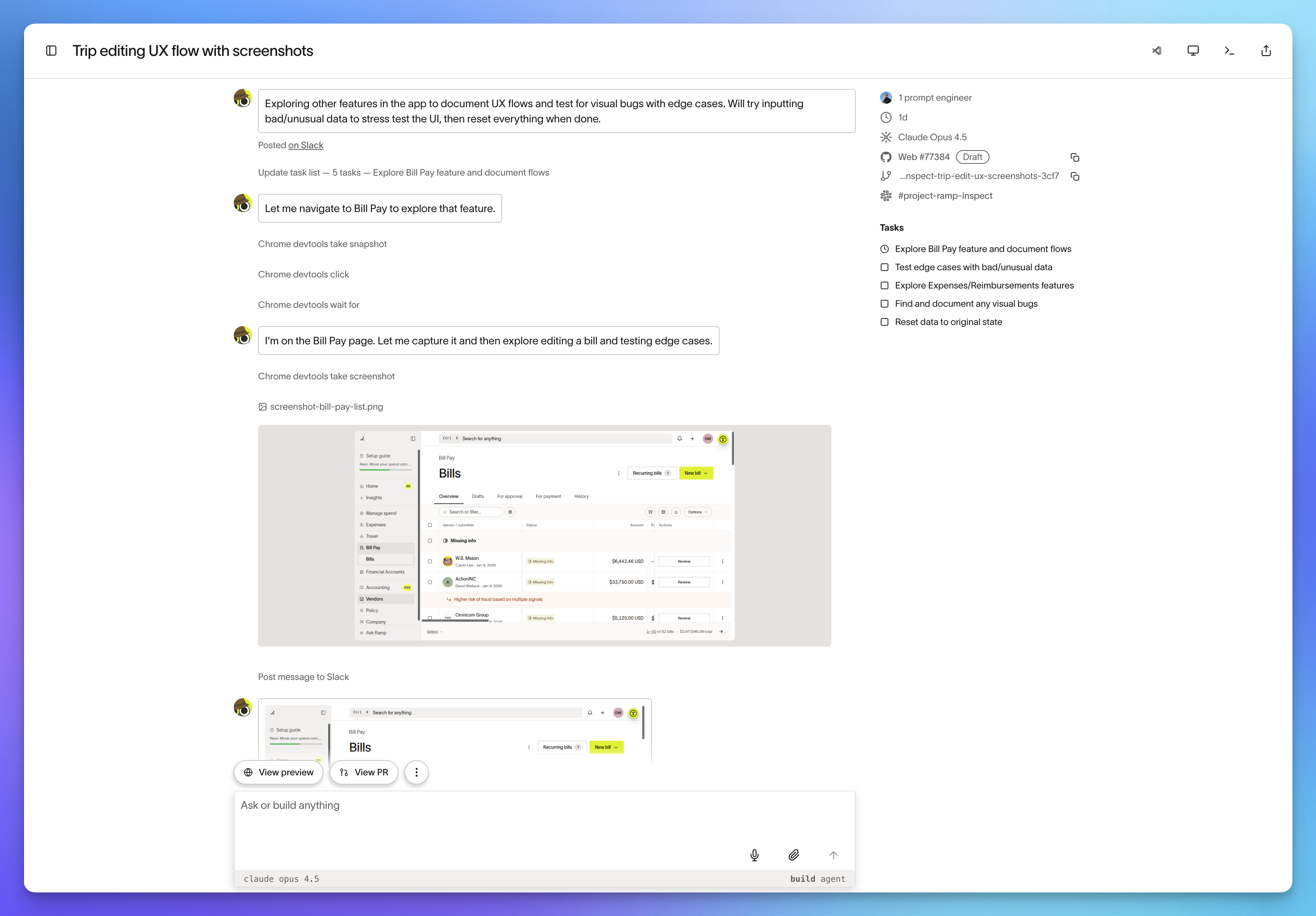
The Ramp engineering team built Inspect, an in-house coding agent equipped with the full context and tooling of a real engineer so it can validate its own work. Inspect runs in sandboxed environments — fast, safe, and efficient enough to handle roughly 30% of all pull requests across Ramp. This post shares the core technical specs and implementation details so anyone can build an equally powerful coding agent of their own.
1. Inspect: An Agent That Works Like an Engineer 🤖
In January 2026 we built our own background coding agent: Inspect. Rather than simply writing code, Inspect uses every available context and tool — just like a real Ramp engineer — to verify its own work and bring tasks to completion.
For backend tasks it runs tests, reviews telemetry, and queries feature flags. For frontend tasks it visually validates results and provides users with screenshots and live previews.
Agents need agency. So we made sure Inspect is limited only by the intelligence of the model itself — not by missing context or missing tools.
Every session runs in a sandboxed VM on Modal, configured identically to local engineer environments with Vite, Postgres, Temporal, and more. It is also connected to tools like Sentry, Datadog, GitHub, and Slack, so any builder with a standard engineering toolchain can contribute.
Fast and Frictionless Workflows ⚡
Inspect sessions start quickly and cost nearly nothing to run, so developers can create sessions freely without worrying about their local environment.
- Run multiple versions of the same prompt in parallel and pick the best result.
- Kick off tasks and check results from mobile without opening a laptop.
- Spotted a bug before heading home? Leave a session open and review the PR in the morning.
Internal adoption has grown explosively. Today roughly 30% of all PRs merged into our frontend and backend repositories are authored by Inspect. We believe anyone can build a tool like this, and we've documented the technical specs below in detail so it's easy to replicate.
2. The Sandbox: The Agent's Workspace 📦
The core of any hosted coding agent is its execution environment. Every new session needs a fresh sandbox with a complete development environment spun up instantly. The key challenge is how fast you can boot that environment — we solved it with Modal.
Efficient Image and Snapshot Strategy
Our approach:
- Image registry: Define an image for each code repository.
- 30-minute build cycle: Every 30 minutes, clone the repository, install dependencies, and run the initial build commands to produce a fresh image.
- Generate tokens via a GitHub App so builds aren't tied to any individual user.
- Snapshot storage: Save the completed image state as a snapshot.
- Session start: Boot a new sandbox from the stored snapshot.
- The repository state will be at most 30 minutes old, so syncing to the latest code is very fast.
- After work completes: Take another snapshot of any changes so users can restore them when making follow-up requests later.
The Agent Engine: OpenCode 🛠️
For the agent that performs work inside the sandbox, we strongly recommend the open-source coding agent OpenCode.
- Server-first architecture: TUI and desktop app are just thin clients, so you can deploy the agent wherever you need it.
- Typed SDK: The technical implementation is solid and the plugin system is comprehensive.
- Code as ground truth: When the documentation is unclear, have AI read OpenCode's source directly — you get accurate behavior with no hallucination.
Tips for Speed Optimization 🚀
- Pre-warm the sandbox: Start warming the sandbox and syncing the latest changes the moment the user begins typing a prompt. By the time they press Enter, it's already ready.
- Allow reads immediately: Let the agent start reading files (researching) before the latest code sync finishes. Block file writes until sync is complete.
- Push work into the build phase: To reduce sandbox runtime, perform all possible setup — running tests, generating cache files, etc. — during the 30-minute image build cycle instead.
3. API and Multiplayer 🤝
You need to build an API to handle input from various clients (chat, Slack, Chrome extension, etc.) and keep state in sync.
Technology Stack: Cloudflare
We use Cloudflare Durable Objects.
- Per-session SQLite DB: Every session gets its own SQLite database. Hundreds of sessions can run concurrently without performance degradation.
- Real-time streaming: We use the Cloudflare Agents SDK to efficiently handle real-time token streaming between the sandbox, API, and clients.
Multiplayer Support
We believe multiplayer is a mission-critical feature. Just as multiple engineers can work on a code branch together, multiple people should be able to collaborate in a single agent session.
We believe multiplayer is a mission-critical feature — and one we haven't seen in other products yet.
This proves invaluable in scenarios like:
- Training: Teaching PMs or designers how to work with AI.
- Live QA: Team members reviewing changes in real time and queuing fix requests on the spot.
- Code review: Instead of leaving comments on a PR, directing the AI to make the fix immediately while reviewing.
Authentication and Security 🔐
Use GitHub authentication so PRs are opened under the user's own token. Opening PRs with a bot account creates the risk of users approving their own changes, so always ensure PRs are created under the user's name.
4. Clients: Work From Anywhere 💻
With the API and sandbox in place, it's time to build clients that fit your organization's workflow.
Slack
Integrating the agent into your team communication tool is highly effective.
- Accessibility: Let users interact in natural language without learning any special syntax.
- Repository classifier: Build a classifier that reads the user's message and automatically selects the right repository for the task. A fast, cheap model (e.g., GPT-5.2) works fine here.
- Progress visibility: Clearly indicate when the agent is working and when it's done — and add custom emoji for a bit of personality.
Web Interface
Build a polished web client that works on both desktop and mobile.
- Hosted VS Code: Serve a VS Code instance running inside the sandbox so users can edit code manually without cloning locally.
- Streaming desktop view: For web projects, let users watch the agent manipulate and validate a browser in real time.
- Stats page: Track and display organization-wide usage and merged PR counts. This is the most important metric for demonstrating that the agent is doing valuable work.
Chrome Extension
To drive adoption among non-engineers, build a Chrome extension that enables visual edits to React apps.
- Visual edits: Select elements on screen and request changes via chat.
- DOM tree usage: Use the DOM and React internal tree instead of raw screenshots to reduce token costs.
- Deployment: Use managed device policy to force-install and deploy the extension to company browsers without going through the Chrome Web Store.
Closing Thoughts
By building our own tooling, we created a system far more powerful than off-the-shelf products and perfectly tailored to our organization. Inspect has accelerated our development velocity and removed any limit on concurrency. Use this guide as your starting point — paste the link into your coding agent and start building. You'll have a powerful new teammate. 🏗️