
This post shares 100 key lessons drawn from the experience of successfully bootstrapping an app to 7-figure revenue. From onboarding to monetization strategies, marketing, and development and operations tips, it provides practical and specific advice for growing an app. This summary will help app developers reduce common trial and error and gain the insights needed to build a successful app business.
1. Successful App Onboarding Strategies 💡
The onboarding process is both your app's first impression and the most critical factor in its success. The key is helping users quickly recognize the app's value and keeping them engaged.
- First impressions matter: Onboarding is essentially your one and only chance to convince users of your app's value. Design it carefully so you don't squander that first meeting.
- Emphasize benefits over features: Users don't care about technical features like an "exclusive algorithm." They care about what advantages the app can give them. Instead of listing features, clearly communicate the benefits users will receive.
- Lead users to their "aha!" moment: Don't leave users to stumble upon the "aha!" moment where they truly grasp your app's value. Guide them directly to that moment through onboarding. The sooner users experience it, the more likely they are to stick around.
- Be thoughtful about notification permission requests: Instead of simply asking for notification permission, show users through a brief explanation what value those notifications will provide. The right context can turn a "no" into a "yes."
- Sign-up comes later: Don't require a sign-up form before users see your app's core value or the paywall screen. Sign-up is one of the biggest drop-off points in the user journey.
- Provide a personalized experience: Personalized onboarding has been shown to perform far better than generic onboarding. Asking a few simple questions and tailoring the experience makes users feel understood.
- Find the right number of onboarding steps: There's no fixed number of onboarding steps. Test endlessly to find the right balance for your app.
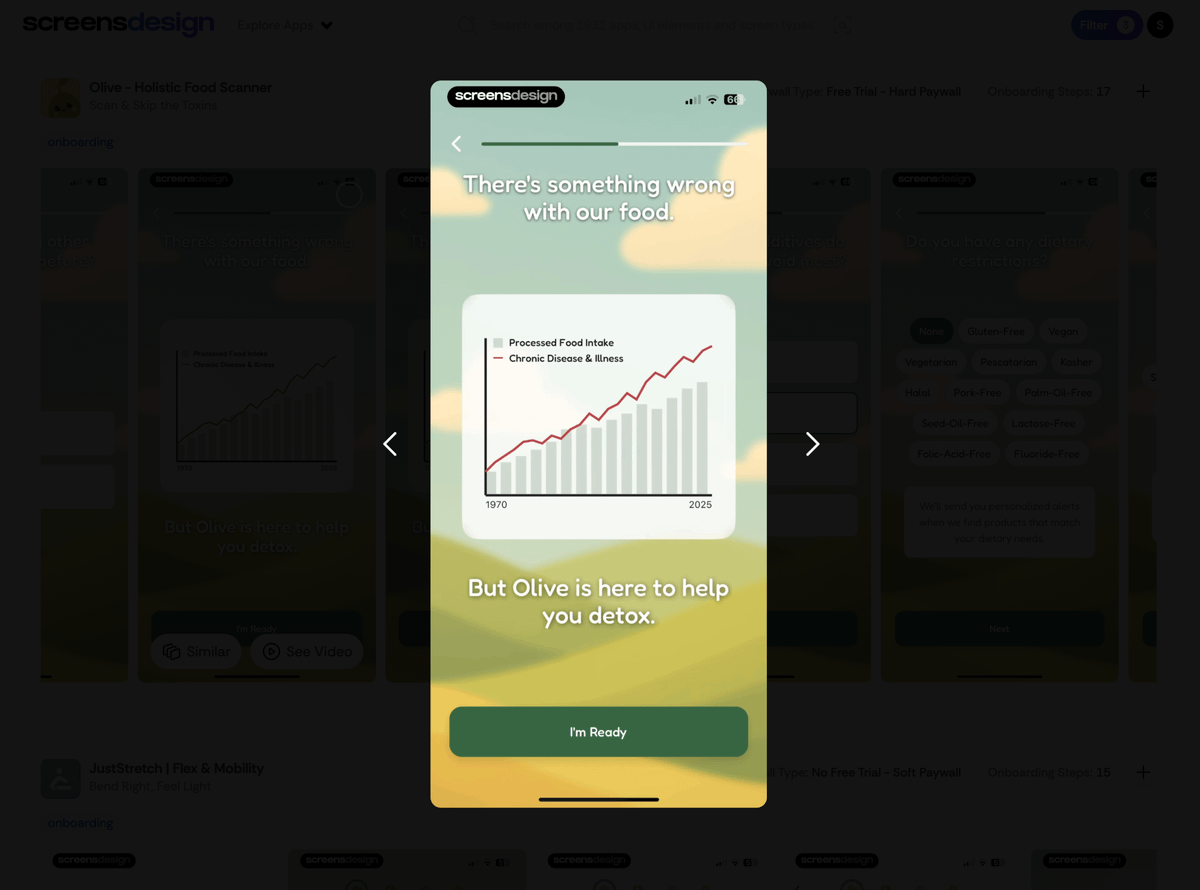
- Progress bars are essential: Multi-step onboarding flows need a progress bar. Letting users see the light at the end of the tunnel reduces drop-off and improves retention. It's also a small signal that you respect their time.
- Show a "before and after": If your app transforms something (photos, fitness, etc.), use powerful visuals to show the "before and after." This helps users instantly understand the app's value and motivates them to get started.
- Incorporate trust signals: Include trust signals like "As seen in the press" or "50,000 happy users" in your onboarding. This makes new users feel they're making a smart choice — not taking a risk.
- Use loading screens wisely: Loading screens during onboarding are valuable real estate. Instead of a blank screen, show user testimonials, ratings, or quick wins to drive engagement and reinforce the user's decision to download.
- Speak your users' language: You built the app for your reasons, but users download it for theirs. Deeply understand what they want — saving time, making money, reducing stress — and speak their language in onboarding. Use user surveys to reflect the most common feedback and improve your flow.
- Use a problem-solution frame: One of the most effective onboarding techniques is first clearly articulating the user's painful problem. For example: "Tired of disorganized notes?" Then immediately present your app as the solution. This makes your value proposition crystal clear.
- Don't ask for information you don't need: Requests for additional information like name, email, or phone number give users another chance to drop off. Unless it's essential for personalization or a core app function, push it to later — or don't ask at all.
- Start with positive questions: Ask a simple, positive question like "Ready to improve your health?" and users will almost certainly tap "Yes." This small, unconscious commitment makes them more likely to continue through the rest of onboarding.
- Use small rituals to drive commitment: Having users draw a checkmark, sign their name, or tap "I promise" is a subtle but powerful onboarding strategy that creates a sense of commitment.
- Use "does this resonate?" questions: Questions like "Do you struggle with staying organized?" prompt users to tap "Yes," which clarifies their problem and positions your app as the solution.
- Provide positive reinforcement: After users make a selection or answer a question, show a screen or message like "Great choice!" or "We've got you!" This small psychological boost makes the app experience feel more like a supportive conversation.
- Celebrate progress: People get hooked on things that make them feel good. Celebrating users' progress helps improve app retention.




2. User Engagement and App Growth Strategies 🚀
Getting users to stay in your app — and to spread the word to others — is essential for app growth. Let's look at how to strengthen your relationship with users and grow your app organically in a competitive mobile market.
- Use leaderboards: Depending on your app type, adding a leaderboard is a great idea. A bit of friendly competition can be a powerful motivator for improving retention.
- Offer shareable milestone cards: When users reach a milestone, give them a beautiful share card. Showing off progress feels rewarding and can help your app spread organically.
- Make referral programs mutually beneficial: Referral programs are hard to get right, but when they work, both sides benefit. Give the referred friend free access or a bonus, and provide a clear reward to the person who referred them.
- App store screenshots are billboards: App store screenshots are one of the first things potential users see. Don't just show random screens — use them to tell a story and clearly communicate your app's key value proposition.
- Fill screenshots with powerful headlines: App store screenshots without strong headlines are wasted space. Use bold, benefit-focused text to clearly tell users what they'll get. Features describe; benefits sell.
- Build for the average user: Build the app for the average user, not yourself. You know your app inside and out, but users are busy, distracted, and may not be as tech-savvy as you are. Always keep this in mind when designing.
- Mixpanel is an essential tool: Tools like Mixpanel will show you which features users love and which are useless. This data is like gold — it tells you where to focus development effort and which new features would be a waste.
- Mine competitor 1-star and 5-star reviews: Read your competitors' 1-star and 5-star reviews. You'll gain incredible insights into what people love and hate, and which features they desperately want. It's an invaluable source of intelligence.
- "New feature" notifications matter: A simple "new feature" popup or section shows users that your app is actively maintained and improving, reinforces the app's value, and increases satisfaction with their subscription.


3. App Development and Operations Efficiency 🛠️
Running a successful app requires strategic thinking not only during development but also in post-launch maintenance and improvement. Using the right tools efficiently and solving problems effectively will save time and money while enhancing the user experience.
- Watch early user session recordings: In the early days, use tools like Smartlook to watch real user session recordings. This is surprisingly helpful for understanding friction points and user behavior that analytics tools won't show you. You don't need it forever, but it's invaluable at the start.
- Add gesture recording: When users send bug screen recordings, having their taps recorded too makes it much easier for you to immediately understand what went wrong. No more mysteries like "I tapped the button and nothing happened!" 😲
- Use skeleton loaders: When your app is loading content like images or videos, don't leave blank boxes. Use skeleton loaders so users see a preview instead of staring at nothing.
- Auto-fill customer support emails: When users tap "Contact Support," automatically populate the email with their device model, OS version, and app version. This eliminates countless back-and-forth emails and enables faster, more effective support.
- Respond to reviews: Replying to reviews — good and bad — shows users you're listening. It builds community, turns negative experiences into positive ones, and shows potential new users that real people care about the app.
- Manage expensive APIs: If you're using expensive APIs like OpenAI, build a way to remotely limit or disable that feature for specific users. This reportedly saved enormous costs. There will always be bad actors trying to abuse your service, so be prepared.
- Show messages when external APIs fail: When a critical external API goes down, your app shouldn't just break. Set up simple, actionable in-app messages that inform users when there's an issue. This manages expectations and prevents a flood of support requests.
- Enable forced updates for critical bugs: If you ship a major bug, you need a way to get all users onto the fixed version as quickly as possible. A forced update popup is your emergency exit. You won't need it often, but you'll be glad it's there when you do.
- Optimize app size: Once your app exceeds 200MB, Apple shows a download confirmation popup to users on cellular connections. This adds unnecessary friction, so optimize your app size where possible.
4. App Monetization and Revenue Strategies 💰
If you've built an app, generating revenue is important. Monetization requires a careful and strategic approach. Understanding the psychology behind user purchases and experimenting to find the optimal revenue model is key.
- Show the paywall during onboarding: This is non-negotiable! As many experts have said, the users most willing to pay for your app are those in the onboarding flow. Their motivation is at its peak — don't miss that window.
- Show the paywall on every app launch: Users may not be ready to buy the first or second time they see the paywall. Showing it every time they open the app is a simple and effective way to continuously drive conversions.
- Hard paywall vs. soft paywall: test to find the answer: There's no universal answer here. You have to test it yourself. For this app, a hard paywall (no access without subscribing) was the right call, but every app is different — this will be one of the most important A/B tests you run.
- Don't be afraid to test bold pricing: Incredibly bold pricing was tested here — for example, comparing a $39.99/year plan against a $99.99/year plan. The results were genuinely surprising. Don't guess what users are willing to pay; let the data speak.
- Testing weekly pricing was eye-opening: There was hesitation about testing weekly pricing, but the results were stunning. Lower price points make users feel far less at risk when trying the app. It was surprising how many people were willing to start with a smaller weekly commitment.
- Weekly pricing takes time to recoup ad spend: Before going all-in on weekly pricing, run a few cohorts for one to two months to understand your real LTV, how many users stick around, and plan your finances accordingly.
- Lifetime access offers produce surprising results: Lifetime access seemed like a bad idea, but trying it proved otherwise. The key is pricing it slightly above your average customer LTV. It's an excellent cash injection and appealing to a certain type of power user.
- Offer a discount on exit from a soft paywall: If you use a soft paywall, trigger a discount offer when users try to leave. You can recapture price-sensitive but interested users.
- Guide users after they start a free trial: When users start a free trial, don't just drop them into the app. Show a screen that highlights the unlocked features and guides them to the most valuable ones. This reinforces value and improves retention.
- Manage cash flow when running ads: When spending heavily on ads, cash flow becomes critical. You have to pay for ads today, but revenue may come in weeks or months later. Services like Headway can bridge that gap.
- Focus on two core metrics: It's easy to drown in data. Staying sane and hitting goals meant focusing on just two things: a) install-to-paid conversion rate and b) average revenue per user (ARPU). Everything else was noise that got in the way of growing the business.
- Mobile app retention is brutal: Don't panic — but don't ignore it either.
- Build your own revenue data dashboard: A webhook system was used to pipe all revenue data into an internal dashboard, making it possible to track cohort performance exactly as needed. Sending events from RevenueCat makes this easier. Don't rely solely on App Store Connect — manage the details with your own tools.
- Look at app usage data alongside subscription events: Sending events from RevenueCat into an analytics tool like Mixpanel is a powerful move. Seeing app usage (e.g., "featureX_used") alongside subscription events (e.g., "trial_started") _on the same chart is enormously helpful for understanding which behaviors lead to revenue.
- Run A/B tests constantly: There was never a single day without an A/B test running. Continuous testing finds small wins that compound over time.
- Don't jump to conclusions too early: Don't declare a winner after one day because one variant is ahead. You need a statistically significant number of users in your test cohorts to trust the results. Ending tests too early is one of the easiest ways to fool yourself.
- Use onboarding funnel reports: Use Mixpanel or Amplitude to build funnel reports for every step of your onboarding. This immediately shows your biggest drop-off points. You might find 40% of users leaving on a specific screen — fix that screen first.
- Build a predictive model: After enough time, you can build a predictive model from your data. Being able to estimate how much revenue a new user will generate (predicted LTV) is a massive advantage, especially in paid advertising. It lets you know immediately whether a campaign is profitable.


5. Effective Advertising and Marketing Strategies 📈
Once you've built your app and set a monetization strategy, it's time to get it in front of users. Effective advertising and marketing are the core engines of app growth. But rather than running ads blindly, you need a data-driven strategic approach.
- Creative is 90% of advertising: This isn't even controversial. As many people have said, the creative accounts for 90% of your ad's performance. Tools like Adbox from Appfigures can help you try a wide variety of creatives.
- Don't trust your gut. Test everything: Creatives we thought were genius often flopped, and ones we almost didn't run became our biggest winners. Your intuition is not a reliable predictor of ad performance. Test everything — especially the weird stuff.
- Secure rights to raw footage when working with creators: This is non-negotiable. When working with creators, make sure your contract specifies rights to all original, unedited footage. One 30-second clip can generate endless ad variations, hooks, and new creatives.
- Feed new creatives every week: Ad fatigue is real. You need to supply your campaigns with fresh creatives every week. This prevents performance from plateauing and constantly gives the algorithm new material to test.
- Retest old winners: Every so often, rerun creatives that were top performers a few months ago. You'll be surprised how often old winners get a second life and perform well again.
- Start DMs to influencers with "PAID PROMOTION": When reaching out on social media, put "PAID PROMOTION" in caps in the DM subject. Their inboxes are flooded. This simple trick makes your message stand out and signals you're a serious partner, not just a fan.
- Match creator age to your target customer: The Meta algorithm is smart. It recognizes the age of people in your ads and tends to show them to similar age groups. When our ideal customers were 30+, partnering with creators who were also 30+ caused conversion rates to soar.
- Give creators freedom within a clear brief: Give creators a clear brief with the key benefits to communicate, then give them creative freedom. Ads produced in their own voice and style feel far more authentic. Micromanaging creators kills the magic.
- Don't mix the US and other countries in the same campaign: Costs, competition, and user behavior in the US are completely different from other regions.
- Test in the US, then expand: Test campaigns primarily targeting the US. CPMs are higher, but ads that succeed in the US almost always perform well in other regions too. This made for a more reliable signal (though this may not apply to every app).
- One test campaign, one scaling campaign: Keep it simple. Run a single test campaign where you feed in new creatives. Once an ad proves itself with significant spend, move it into the main scaling campaign.
- Set your ad account timezone to US (when targeting the US): If you're targeting the US, set your ad account timezone to US. If your account is set to a local timezone (e.g., Europe), Meta's "day" resets at local midnight — which could be midday in the US — and this can wreck your budget pacing.
- Be prepared to lose money before you win: Paid advertising is not a magic money machine from day one. If you're not prepared to "lose" at least $5,000, don't start. Think of it as tuition for learning what works in your app.
- Advertising takes time. Be patient: You can't expect a new campaign to be profitable on day one. The algorithm needs time to learn and find your audience. Judging too quickly and killing campaigns too early is a beginner mistake.
- Use the Meta Ad Library: The Meta Ad Library is free and an absolute goldmine. Search for competitors and see what ads they're running. Pay attention to ads that have been active for a long time — those are usually their winners. Save the best ones and use them for inspiration.
- Time your review requests carefully: Many apps ask for reviews during onboarding, but the review prompt was triggered only after users experienced the app's key "aha!" moment. At that point they're most satisfied, so you're far more likely to get a positive review.
- Create a native-feeling review request screen: If you want to ask for reviews during onboarding, make it feel native. A custom screen that explains why feedback matters (and shows ratings/testimonials) works very well.
- Report abusive reviews: If a review is abusive, spam, or clearly violates App Store guidelines, report it. Surprisingly, many reviews actually do get removed. It's a simple way to manage your rating.
- Never buy reviews: Buying reviews is a terrible idea and can ultimately get your account banned. To get initial traction, ask friends, family, and early supporters to download the app and leave honest reviews.
- Get early users through thousands of emails: In the very early days, thousands of emails were sent offering people free access to the app. That's how the first real users and initial reviews were acquired. It's a grind, but it works.
- Use a "how did you hear about us?" question: If you're running paid ads across multiple channels (TikTok, Meta, Google), add a simple "how did you hear about us?" screen to onboarding. The data won't be perfect, but it provides valuable directional insight into your marketing spend.
- Send retention emails to churned users: Don't waste the emails you've collected. For users who subscribed and churned, send a follow-up email with a special discount. You can link to a web payment page to win them back.
- Target users who canceled their trial: Keep track of users who canceled their trial. The next time they open the app, they're clearly still interested. Offer them a targeted "welcome back" special discount. This is a highly effective way to re-engage lapsed trial users.


6. Advice for Sustained Growth and Long-Term Success 🌳
An app business is a marathon, not a sprint. Maintaining consistency, using user feedback wisely, and continuously learning and adapting are the keys to long-term success.
- Use in-app surveys: In the early days when product direction isn't set yet, in-app surveys are a great way to collect feedback. Ask users what they'd like to see next, or why they signed up. It's a direct line into the minds of your customers.
- Consistency is everything: If you truly believe in what you're building, don't quit. The road is incredibly steep and there will be moments you want to give up. Consistency is the ultimate superpower. You'll thank yourself later for not quitting too soon.
- Focus on one app: During hard times it's easy to get seduced by "better" app ideas. For solo developers or small teams, this loss of focus is poison. Commit to one project and see it through. Master the entire process before splitting your attention.
- "Build it and they will come" is a myth: Launching the app is the beginning, not the end. Don't launch your app, hope for an algorithmic magic boost, and move on to the next project. Success comes through iteration.
- Learn before you outsource: Unless you're hiring the absolute best in the world, you need to understand the work before outsourcing it. Mastering the basics of marketing, support, and design makes you far more effective at managing and evaluating the people you hire.
- Look for patterns in user feedback: Listen to user feedback, but don't let a single piece of it completely derail your product roadmap. Look for patterns. One complaint is a one-off. Twenty complaints are a pattern.
- Analyze your competitors' full strategy: Look at your major competitors and analyze their entire strategy. What does their onboarding flow look like? How do they price? What's their marketing strategy? You'll discover patterns and best practices you can apply and test in your own app.
- Find your target customers on competitors' social media: Visit competitors' social media pages. Who follows them? Who comments on their posts? These are your already-validated, pre-aggregated target customers. Engage with them, learn from their comments, and better understand the community.
- Understand your app's seasonality: Many apps are seasonal. Don't panic when performance dips. Your app's performance will fluctuate — some months will be great and some won't. Early on, a temporary dip in performance caused panic. Don't make rushed decisions during a downturn.
- Watch out for peak-season ad costs: Meta ad costs in particular can spike dramatically during the Black Friday and Christmas holiday season (Q4). That's when big brands with massive budgets flood the bidding market. Keep this in mind and adjust your strategy accordingly, or you risk burning through cash with worse returns.
- Optimize your App Store keywords: When optimizing your App Store listing, use tools like Appfigures's App Store Optimization (ASO). Don't just target keywords with the most traffic. Focus on keywords that will attract users actively searching for the solution your app provides. Quality over quantity.
- Localization is growth at scale: Translating your app into a few major languages can drive enormous user acquisition. With AI, it's easier than ever.
- Network with other developers: This is a cheat code. Getting started with this too late was a mistake. Connecting with fellow developers is one of the best things you can do. Share wins, learn from their mistakes, and avoid costly errors. You're all on the same journey.
- You don't need to reinvent the wheel: Stand on the shoulders of giants. There are countless people sharing incredible insights. Learn from them.
- Don't chase every "viral" marketing hack: You'll see a tweet about some "magical" new method, try to replicate it, fail, and feel deflated. This happened here too. Not everything that glitters is gold. Focus on the fundamentals.
- Design your empty states: What does a user see when they open a feature for the first time with no data? A blank screen is a dead end. Use that space to guide, educate, and prompt users toward an action that will fill the screen.
- Use remote configuration for everything: The kill switch was mentioned earlier, but use it for much more — pricing, promotional text, feature flags. This lets you make changes and run tests instantly without waiting for an app review cycle. It's like having a superpower.
- Defer dark mode: Thinking about adding dark mode from day one? Use that time to think about your app launch strategy instead.
- Most importantly: celebrate small wins!: Hit your first 10 subscribers? Fixed a really annoying bug? Got a great review? Take a moment to acknowledge it. The journey is long and hard, and you have to enjoy it! 🎉
Conclusion 🌟
These 100 lessons drawn from a bootstrapped app journey provide practical guidance at every stage of app development and operation. They underscore that onboarding excellence, data-driven decision-making, relentless focus on user experience, and continuous testing and learning are the core ingredients for app success. May these lessons help your own app find its path to a successful journey! 💪