Building AI agents from scratch easily leads to complexity, cost, and reliability issues. Guided by the principle of "only use AI agents when truly necessary," this article walks through five core workflow patterns that can solve many real-world problems more easily. Each pattern is explained with its rationale, implementation details, and pros and cons, accompanied by actual code examples.
1. What Is an AI Agent? And Do You Really Need One?
The term "agent" gets thrown around constantly in the AI industry. In practice, it boils down to "a system that receives complex instructions, plans on its own, uses tools, and executes appropriately."
A common mistake many developers make is trying to handle everything in a single massive LLM (Large Language Model) prompt, only to find errors hidden along the way with no easy way to trace where things went wrong.
"When you ask too much of a single large LLM call, it becomes very difficult to figure out where problems occurred."
Because of this complexity, what most AI systems actually need is not a sophisticated agent but a better-designed workflow -- a point that is often overlooked.
2. A Good Workflow Tool: A Brief Introduction to the Opik Platform
The article uses the open-source platform Opik as its example tool. Opik is used by companies like Uber, Etsy, and Netflix, and offers the following capabilities:
- Visualize request flows to quickly identify issues
- Compare various experiments and configurations to find optimal setups
- LLM prompt version management and automated optimization

3. Try These 5 Workflow Patterns Before Reaching for Agents
Instead of jumping straight to agents for complex tasks, try applying these five patterns incrementally.
"Most use cases don't need agents. They need better workflows."
3.1 Prompt Chaining
This approach sequentially chains multiple LLM calls (prompts or processing steps). Each step has a clear objective, making it easy to identify which step caused an error when problems arise.
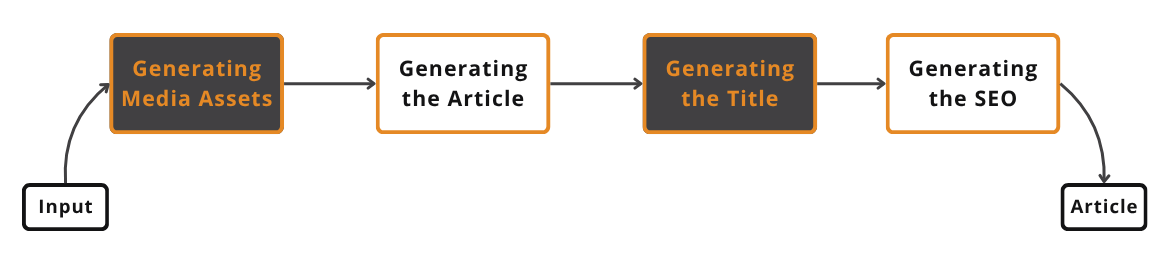
Example workflow:
- Generate media assets -> 2. Write article -> 3. Generate title -> 4. Generate SEO metadata
Pros
- Easy to separate and swap components
- Each prompt has a clear purpose, increasing reliability
- Easy to debug
Cons
- More chaining means more latency and cost
- If any single step fails, the entire pipeline stops
"It looks deceptively easy in theory, but in practice, deciding how to split your prompts is a constant process of trial and error."
3.2 Parallelization
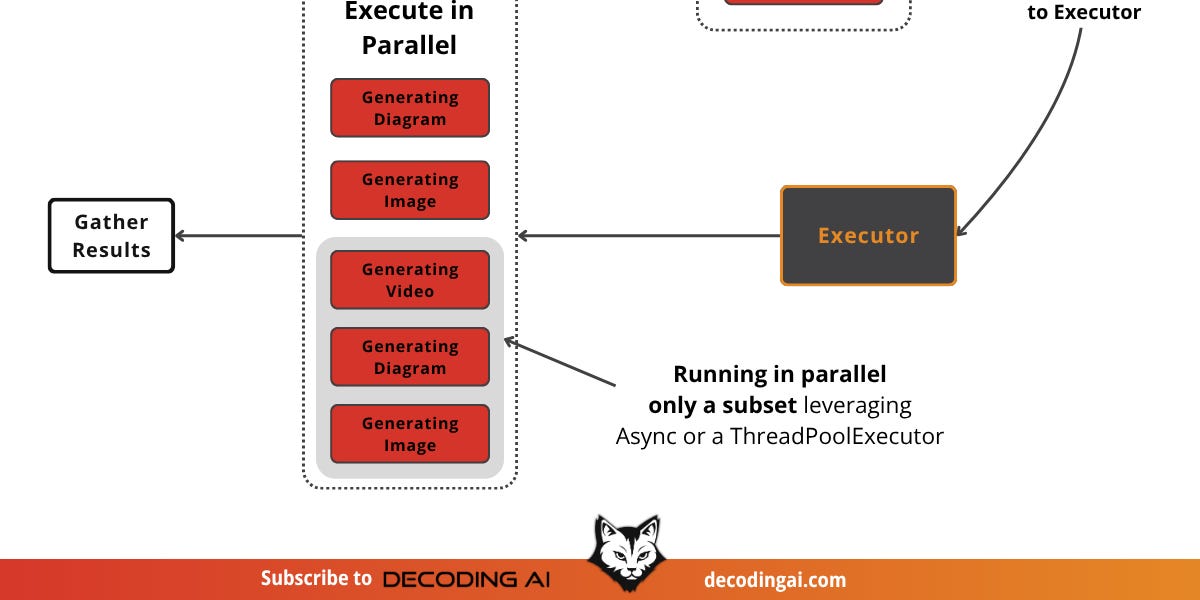
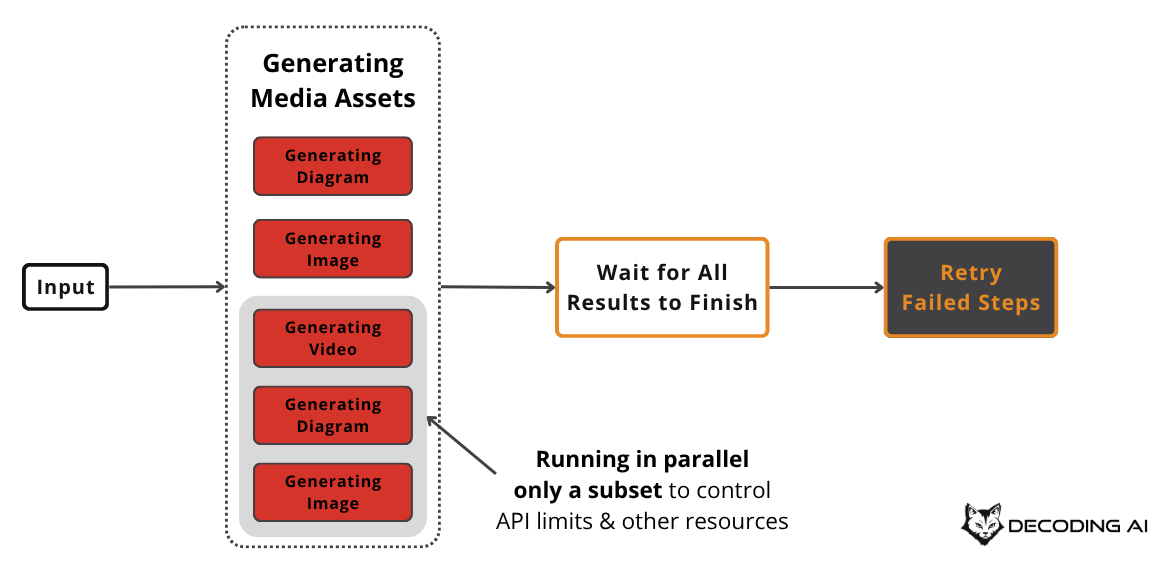
This approach runs independent tasks simultaneously. For example, generating multiple images or diagrams asynchronously at the same time.
Tips & Considerations
- Always account for API rate limiting
- Implement retry logic (exponential backoff) and limit maximum concurrent executions
3.3 Routing
This pattern branches tasks along different paths based on input. Like a smart if-else statement, it applies tailored processing depending on input conditions.
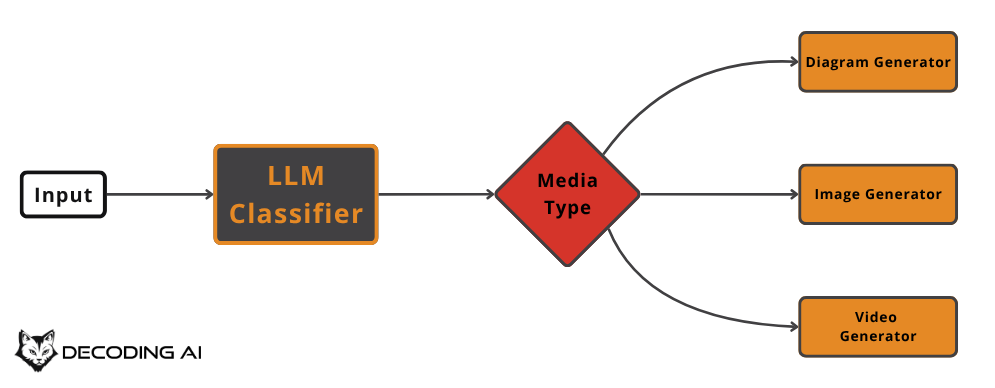
Tip: Use cheaper LLMs for simple classification tasks like routing.
Important: Always create a "default case" path (for unexpected inputs) to improve system stability.
3.4 Orchestrator-Worker
The orchestrator (a central LLM) breaks the input into multiple subtasks, then delegates each one to specialized workers in parallel.
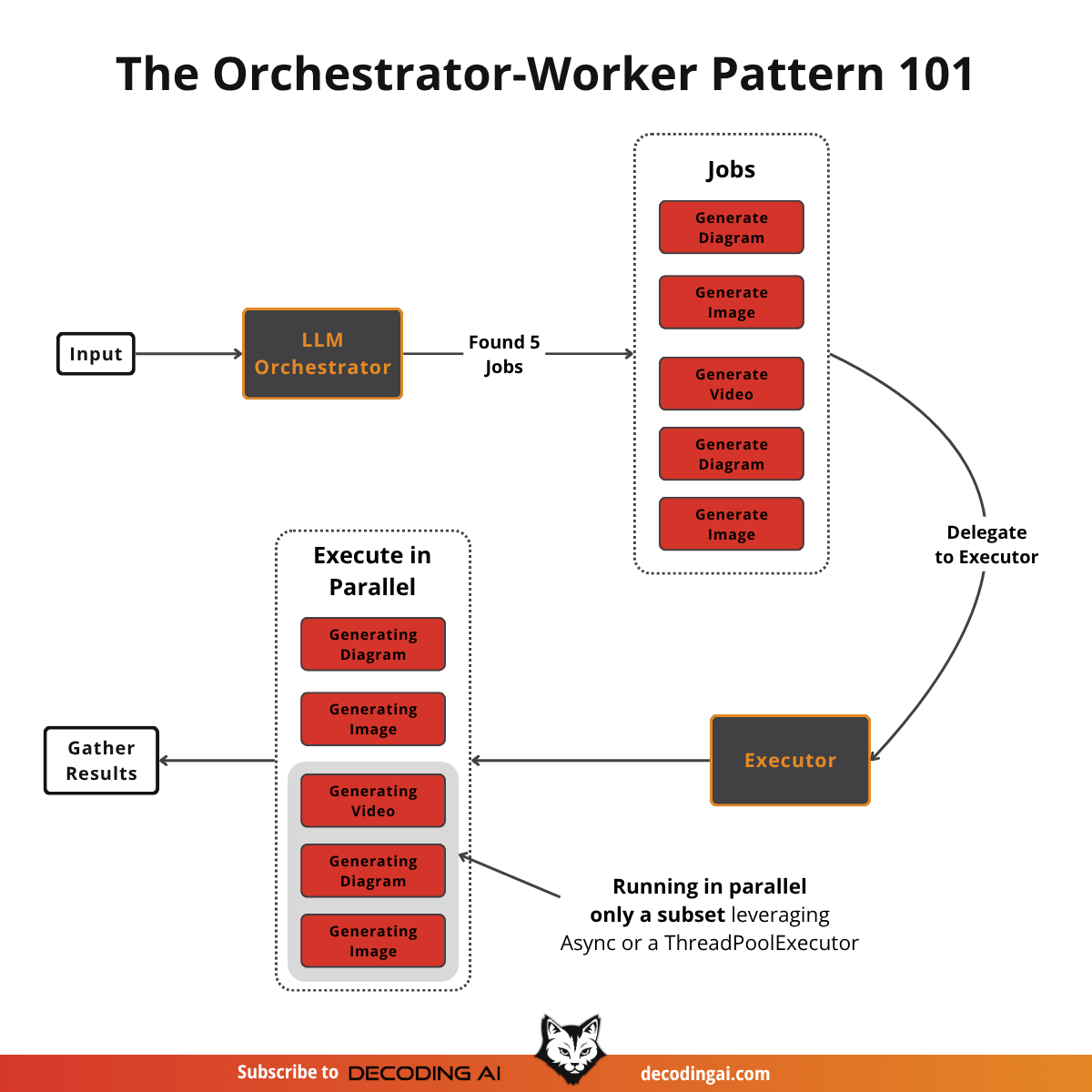
- Similar to Map-Reduce in data engineering.
- While routing selects a single path, the orchestrator-worker dynamically assigns multiple tasks simultaneously.
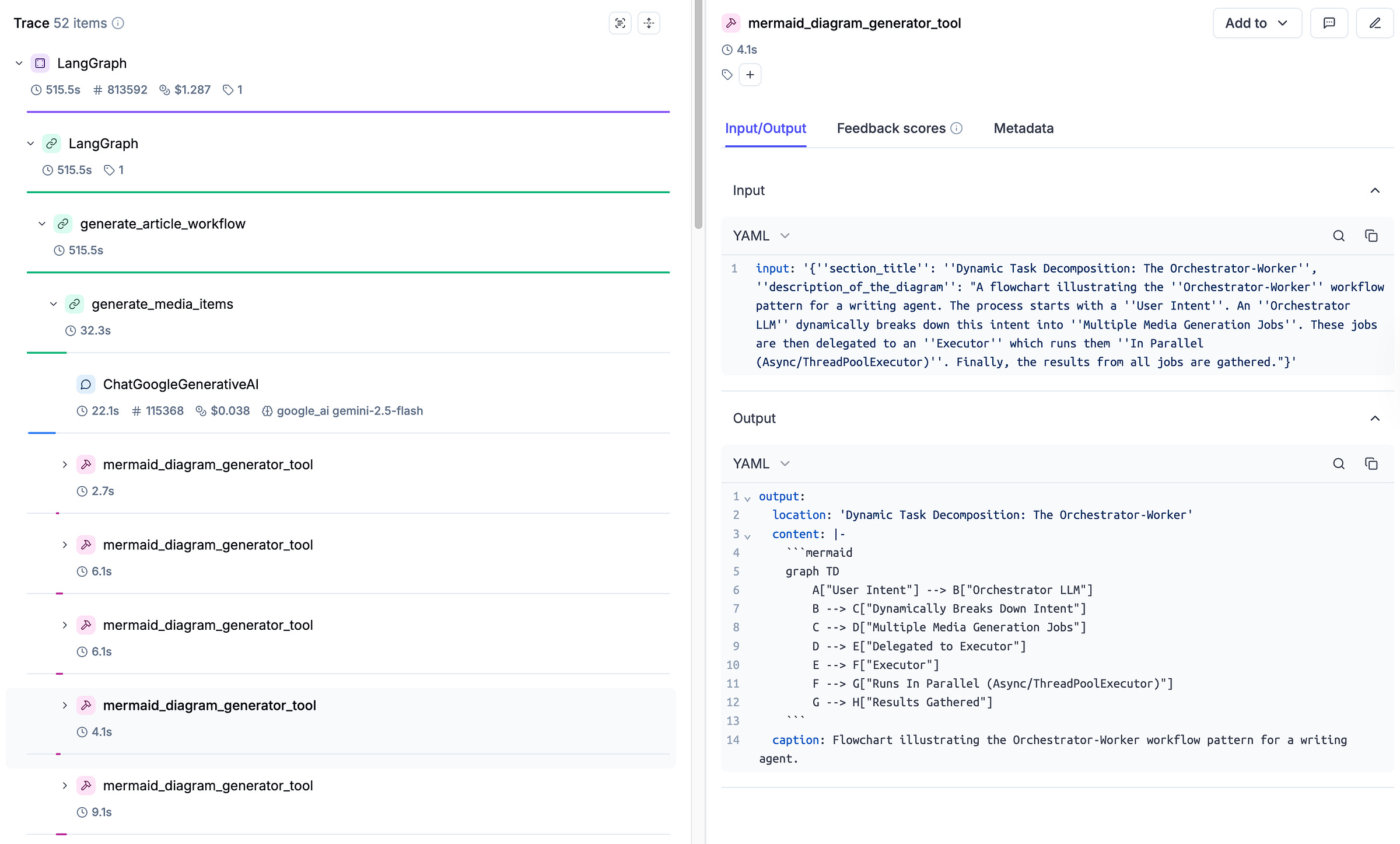
Tip: Since the types and number of tasks vary per input, a "tool plugin" architecture is recommended.
3.5 Evaluator-Optimizer
This pattern is a loop-based quality improvement workflow that repeats the cycle of generate -> evaluate -> improve. Through a feedback loop, the quality of outputs can be continuously raised.
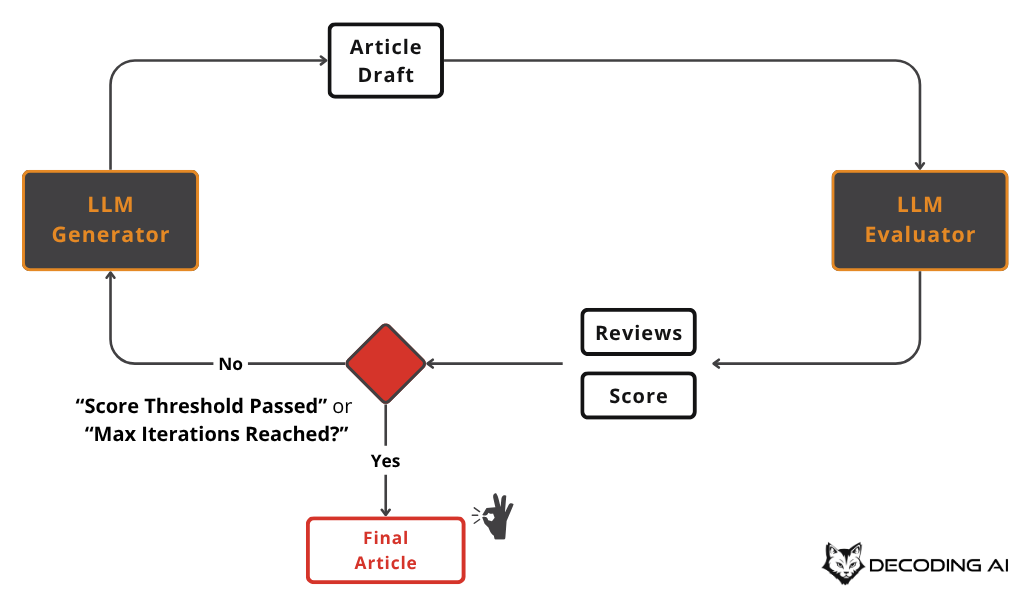
In practice:
- Generate a first draft of an article ->
- The evaluator provides feedback: "readability 0.7 / tone mismatch / logical errors found" ->
- Incorporate improvements and regenerate... Repeat until the target score or maximum iteration count is reached.
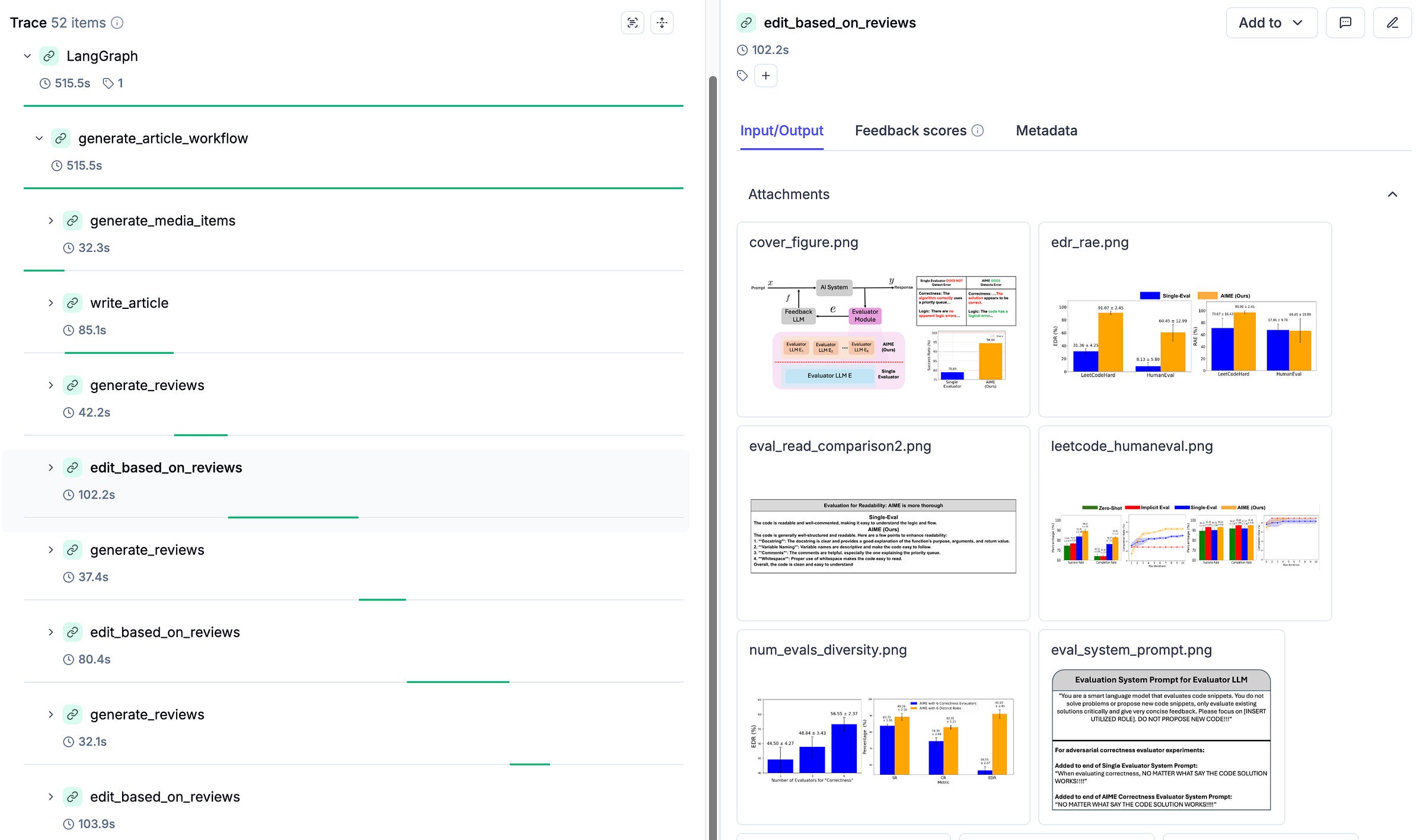
"This pattern may look like agentic behavior to some degree, but it is actually a clearly controlled structure."
Key Failure Risk
- It can fall into an infinite loop. -> Always terminate with a "maximum iteration count" or "target score reached" condition.
4. Summary of Workflow Pattern Application Strategy
Recommended strategy in practice:
- Try solving the problem with a single prompt first
- If that works well, stop there
- If not, apply the five patterns above
- If that still does not work, only then consider building an agent
"Most problems can be solved not with agents, but with better workflows."
5. Next Steps and References
This article is part of an AI Agent Fundamentals series, which will cover AI agent and workflow design and implementation across nine installments.
Upcoming table of contents:
- Workflows vs. Agents
- Context Engineering
- Structured Output
- 5 Workflow Patterns (this article)
- Tool Use (coming soon)
- Planning and ReAct Patterns
- Building ReAct from Scratch
- Memory
- Multimodal Data
If you are interested in the course, more examples, and code, join the Agentic AI Engineering course waitlist or visit the link below. Also, try out Opik, which is free to use!
Closing Thoughts
Before obsessing over building complex AI agents, focus on the essence of problem-solving through the five workflow patterns. Remember that agents should be a "last resort," not a first choice. In our experience, most problems can be solved sufficiently -- and more efficiently -- through smarter workflow design.
"Most use cases don't need agents. They need better workflows."
If you have questions or thoughts, feel free to leave them in the comments