
Nano Banana Pro goes beyond simple "fun" image generation to enable practical professional-grade asset production including text rendering, character consistency, and high-resolution (4K) output. Equipped with a "Thinking" capability that understands user intent and physical laws, this model handles complex editing tasks and information visualization with impressive results. This guide provides a detailed walkthrough of the core features of Nano Banana Pro as introduced by Guillaume Vernade, a developer advocate at Google DeepMind, along with 10 prompt-writing secrets for getting the most out of it.
1. The Golden Rules of Prompting
Nano Banana Pro is not a simple keyword-matching machine -- it is a "thinking" model. It understands intent, physics, and composition. To get the best results, you need to abandon the old "tag soups" approach of "dog, park, 4k, realistic." Instead, act as if you are a creative director.
The model understands conversational editing remarkably well. If an image is about 80% right, do not start over from scratch -- just point out the specific parts you want changed.
"Looks good. But change the lighting to golden hour and make the text neon blue."
Talk to the model as you would instruct a human artist -- use grammatically complete sentences and specific adjectives.
Bad example: "Cool car, neon, city, night, 8k."
Good example: "A cinematic wide shot of a futuristic sports car speeding through the rain-soaked streets of Tokyo at night. Neon signs reflecting off the wet asphalt and the car's metallic body."
Also, vague prompts produce generic results. Clearly define the subject, background, lighting, and mood. When describing textures, be specific: "matte finish," "brushed steel," "soft velvet." This helps the model understand context and make logical artistic decisions.
2. Text Rendering and Information Visualization (Text Rendering, Infographics & Visual Synthesis)
Nano Banana Pro demonstrates state-of-the-art (SOTA) capabilities in rendering legible text and synthesizing complex information visually.
- Compression: Ask it to compress dense text or PDF content into visual materials.
- Style: Specify the desired look -- "sleek editorial style," "technical blueprint," "hand-drawn whiteboard."
- Quotation: Clearly enclose any text you want in the image with quotation marks.
Use Case Examples
1. Earnings Report Infographic Upload a PDF and summarize key financial highlights as a clean infographic.
"Generate a clean, modern infographic summarizing the key financial highlights from this earnings report. Include 'Revenue Growth' and 'Net Income' charts, and highlight the CEO's key message in a stylish quote box."
2. Retro-Style Infographic Designs reflecting historical periods are also possible.
"Create a 1950s retro-style infographic about the history of American diners. Clearly separate the sections for 'Food,' 'Jukebox,' and 'Interior.' All text must be legible and styled to match the era."

3. Technical Drawings and Educational Materials Complex diagrams such as architectural blueprints or lecture-style whiteboard notes are no problem.
"Create an orthographic projection blueprint explaining this building with plan, elevation, and section views. Clearly label 'North Elevation' and 'Main Entrance' in a technical architectural font. Use 16:9 aspect ratio."

"Summarize the concept of 'Transformer Neural Network Architecture' as a hand-drawn whiteboard diagram suitable for a university lecture. Use different colored markers for encoder and decoder blocks, and include legible labels for 'Self-Attention' and 'Feed Forward.'"

3. Character Consistency and Viral Thumbnails
The model supports up to 14 reference images (6 for high resolution), enabling "Identity Locking." This means you can place a specific person or character in new scenarios without facial distortion.
- Tip: Explicitly state "Keep the facial features exactly like image 1."
- Use case: Keep the person the same while changing only their expression or pose, or create eye-catching viral thumbnails in a single pass.
Use Case Examples
1. Viral Thumbnail Creation Composite a person, text, and graphic elements all at once to create YouTube-style thumbnails.
"Design a viral video thumbnail using the person from image 1. Face consistency: Keep the facial features exactly like image 1 but change the expression to excited and surprised. Action: Place the person on the left, pointing to the right side of the frame. Subject: Place a delicious high-res avocado toast image on the right. Graphics: Add a bold yellow arrow connecting the person's finger to the toast. Text: Display huge pop-style text saying 'Done in 3 Minutes!' in the center. Give it a thick white border and drop shadow. Background: Blurry, bright kitchen. Boost saturation and contrast."

2. Character Storytelling & Brand Assets Generate stories with multiple characters or various product lookbooks with consistent identity.
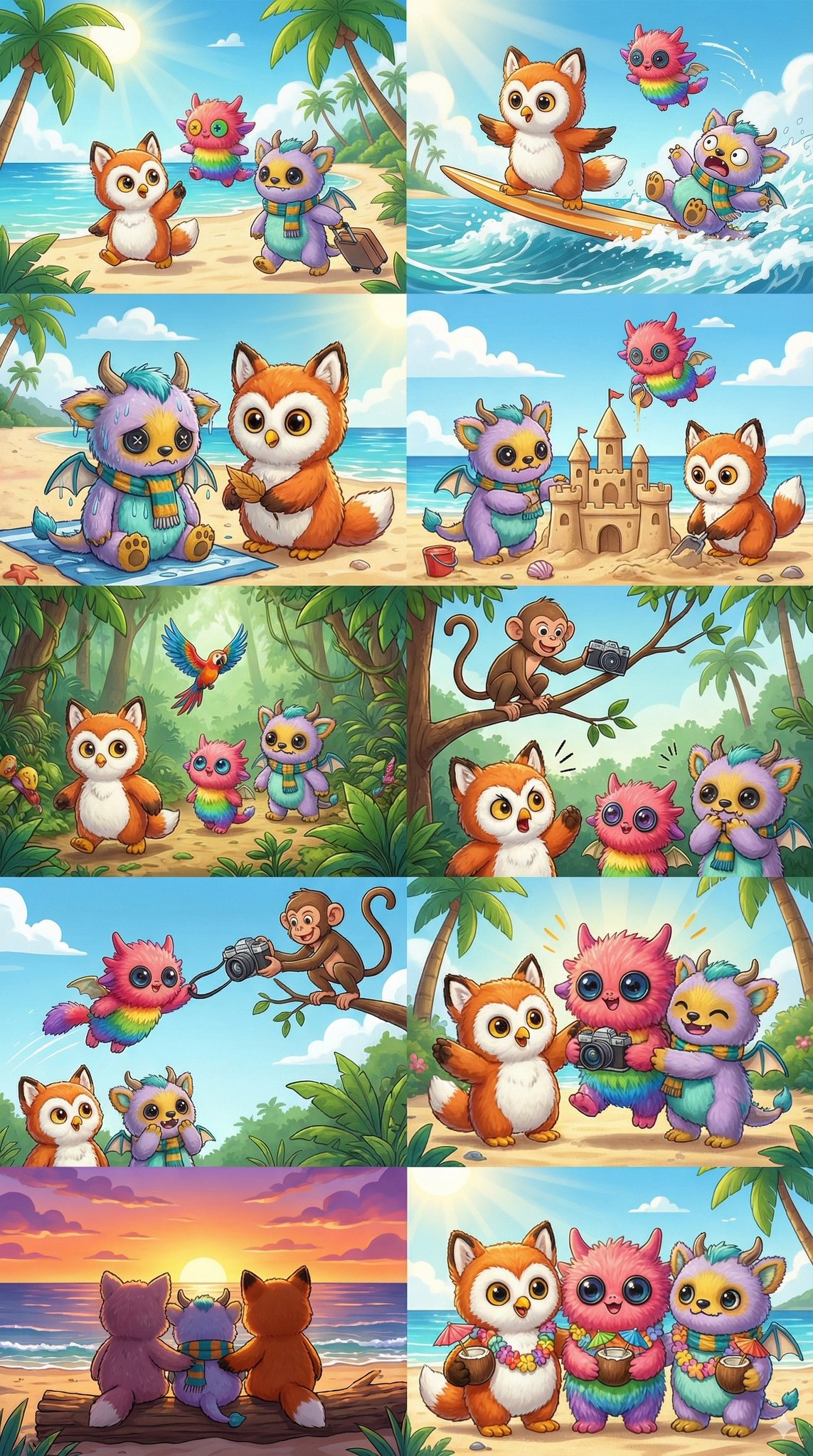
[Input 3 plush toy images] "Create a fun 10-part story of these three furry friends going on a tropical vacation. The story should have emotional ups and downs and end on a happy note. Maintain the three characters' outfits and identity but vary expressions and angles across all 10 images. Each image should feature only one character."
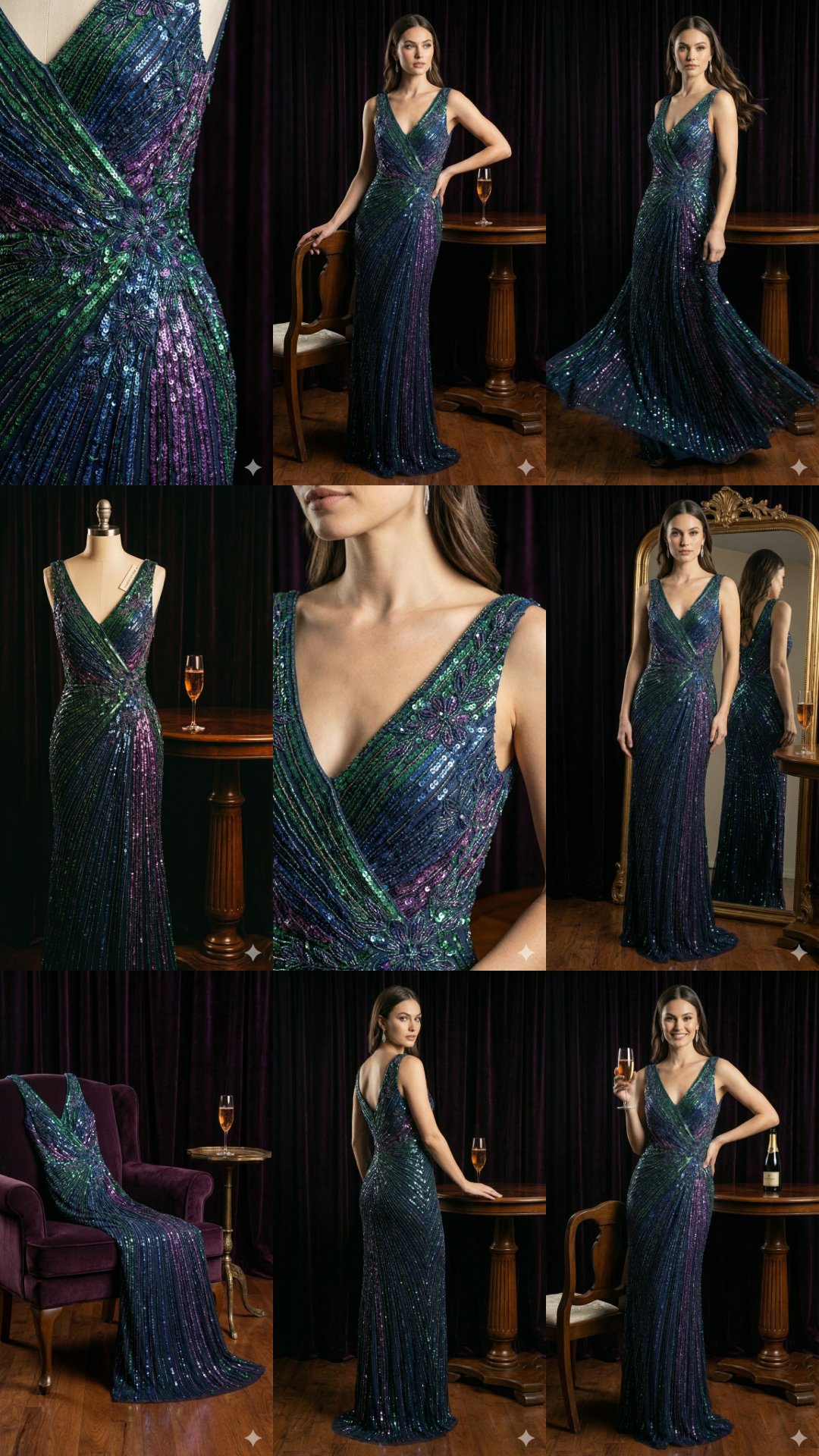
[Input 1 product image] "Create 9 stunning fashion shots as if they appeared in an award-winning fashion lookbook. Use this reference image as the brand style but add nuance and variety with a professional design touch. Generate images one at a time."
4. Grounding with Google Search
Nano Banana Pro leverages Google Search to generate images based on real-time data, current events, and fact-checking. This helps reduce hallucination -- where AI fabricates information about current topics.
- Use case: Request visualizations of fluctuating data such as weather, stocks, or news. The model "thinks" (reasons) based on search results before generating the image.
Use Case Example
"Generate an infographic about the best time to visit US National Parks in 2025 based on current travel trends."

5. Advanced Editing, Restoration & Colorization
Complex edits can be accomplished simply by asking conversationally. You can remove specific elements (in-painting), restore old photos, colorize black-and-white comics, or change styles.
- Advantage: No manual masking required. Even complex changes that require physical understanding, such as "fill this glass with water," are possible.
Use Case Examples
1. Object Removal and In-painting Remove tourists from a photo and fill the space with natural background.
"Remove the tourists from the background of this photo and fill the empty space with textures that logically match the surroundings (gravel path and shop fronts)."

2. Comic Colorization and Localization Colorize black-and-white comics or localize advertising posters for different cultural markets.
[Input black-and-white comic panel] "Colorize this comic panel. Use a vibrant animation-style palette. Make the energy beam lighting effects glow neon blue, and match the character costumes to the official colors."

[Input London bus stop ad image] "Localize this concept for a Tokyo setting. Translate the tagline into Japanese. Change the background to a bustling Shibuya street at night."

3. Season and Lighting Changes Completely transform the seasonal feel of the same building.
"Convert this scene to winter. Keep the architecture exactly the same but add snow to the roof and yard, and change the lighting to a cold, overcast afternoon feel."

6. Dimensional Translation: 2D to 3D
A powerful feature that converts 2D drawings into 3D visualizations, or vice versa. Extremely useful for interior designers, architects, and meme creators.
Use Case Examples
1. 2D Floor Plan to 3D Interior Board
"Based on the uploaded 2D floor plan, generate a professional interior design presentation board as a single image. Layout: Collage format with a wide-angle perspective of the living room (large main image) at the top, and 3 smaller images (master bedroom, study, 3D top-down floor plan) at the bottom. Style: Modern minimalist with warm oak floors and off-white walls applied to all images. Quality: Realistic rendering, soft natural lighting."

2. 2D Meme to 3D Conversion
"Convert the 'This is Fine' dog meme into a realistic 3D rendering. Keep the exact same composition, but make the dog look like a plush toy and the fire look like real flames."

7. High-Resolution and Textures
Nano Banana Pro natively supports 1K to 4K image generation. This is useful when detailed textures or large-format output is needed. Explicitly request 2K or 4K resolution in the API or interface, and describe surface textures and imperfections to enhance realism.
Use Case Examples
"Using native high-resolution output, create a breathtakingly atmospheric mossy forest floor environment. Render complex lighting effects and delicate textures so that every moss strand and light beam is rendered at pixel-perfect 4K wallpaper resolution."

"Create a hyper-realistic infographic of a handmade cheeseburger. It should be a layer-by-layer deconstructed view showing the texture of the toasted brioche bun, the charred surface of the patty, and the glossy sheen of melting cheese. Label the flavor profile of each layer."

8. Thinking and Reasoning
The model generates intermediate "thinking images" before producing the final result, refining composition along the way (this process is not billed). This enables data analysis and visual problem-solving.
Use Case Examples
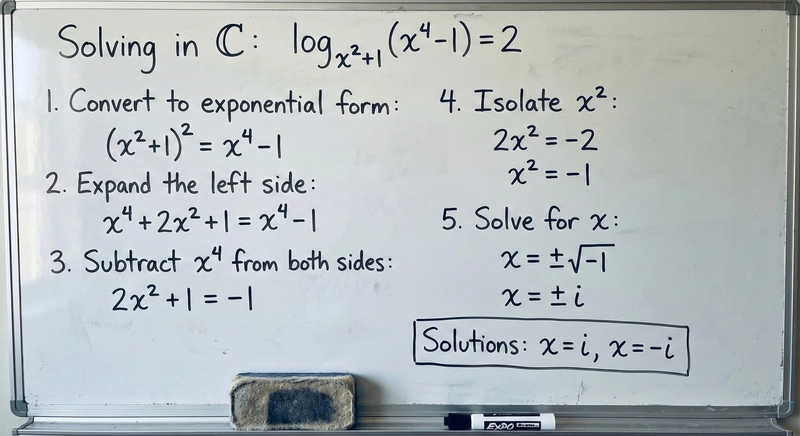
1. Math Problem Solving
"Solve the equation log_{x^2+1}(x^4-1)=2 (complex domain) on a whiteboard. Show the solution process clearly."
2. Visual Reasoning
"Analyze this room photo and generate a 'Before' image showing what it looked like during construction. Include exposed framing and unfinished drywall."

9. One-Shot Storyboarding and Concept Art
Generate sequential artwork or storyboards without grids, maintaining a consistent narrative within a single session. Useful for film concept art and mock leaked shots.
Use Case Example
"Create an exciting 9-part story in 9 images featuring the man and woman from an award-winning luxury luggage ad. The story should have emotional highs and lows and end with an elegant shot of the woman appearing with the logo. Maintain both characters' identity and outfits throughout but vary angles and distances. Generate images one at a time, all in 16:9 landscape format."

10. Structural Control and Layout Guidance
Input images are not just references. They can be used to strictly control the composition and layout of the final output. This is a game changer for designers turning napkin sketches or wireframes into polished assets.
- Sketches: Upload hand-drawn sketches to specify text and object placement.
- Wireframes: Create high-quality UI mockups from existing layout screenshots.
- Grids: Use grid images for tile-based game assets or LED display assets.
Use Case Examples
1. Sketch to Advertisement
"Following this sketch, create an advertisement for [product]."

2. Wireframe to UI Mockup
"Following these guidelines, create a mockup for [product]."

3. Pixel Art and Sprite Sheets
"Generate a unicorn pixel art sprite that fits exactly in this 64x64 grid image. Use high-contrast colors."

"Create a sprite sheet of a woman doing a backflip off a drone. 3x3 grid, sequence, frame-by-frame animation, square aspect ratio. Follow the structure of the attached reference image exactly."

In Closing
Now that you have learned the powerful features and prompt secrets of Nano Banana Pro, it is time to start creating!
- Experiment in the UI: The fastest way to test prompts and parameters.
- Build your dream app: Use your best prompts and code your own application.
- Build applications: For serious development, refer to guides and code snippets to start building.
Go beyond simple image generation and expand the limits of your creativity with Nano Banana Pro, which turns your imagination into real-world assets.